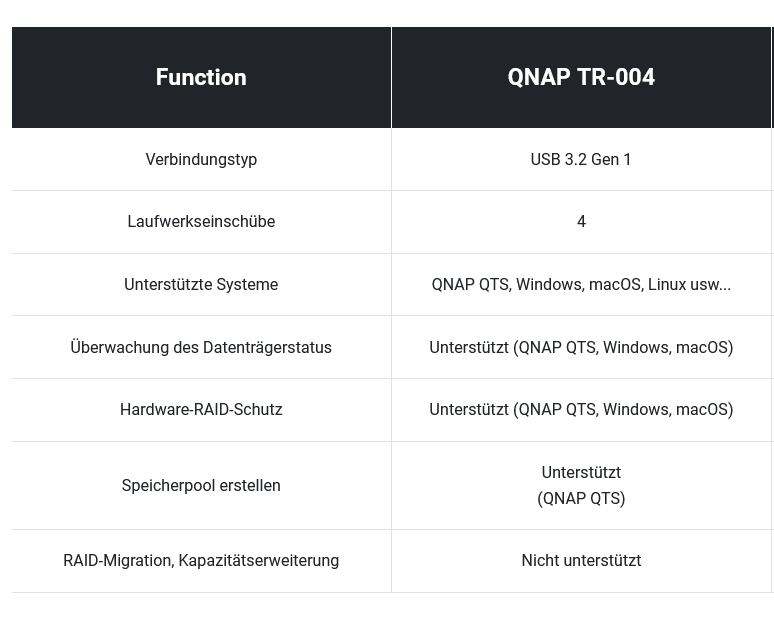
I recently got a QNAP TR-004 and connected it to a Windows computer. For now, I have only installed 2 8TB hard drives and set them up in RAID 1 (hardware). I initialized and formatted the drives, and an 8TB drive is recognized, just as it should be.
If I later add two more hard drives into the still empty slots and then need to initialize them, will the data on the already existing drives be overwritten?
Or to put it another way, can I simply add two more hard drives later to further expand the capacity, and will the data on the already existing drives remain untouched? Is there anything specific I need to pay attention to?
Thank you for the clarification, I wasn’t really aware of the terminology.
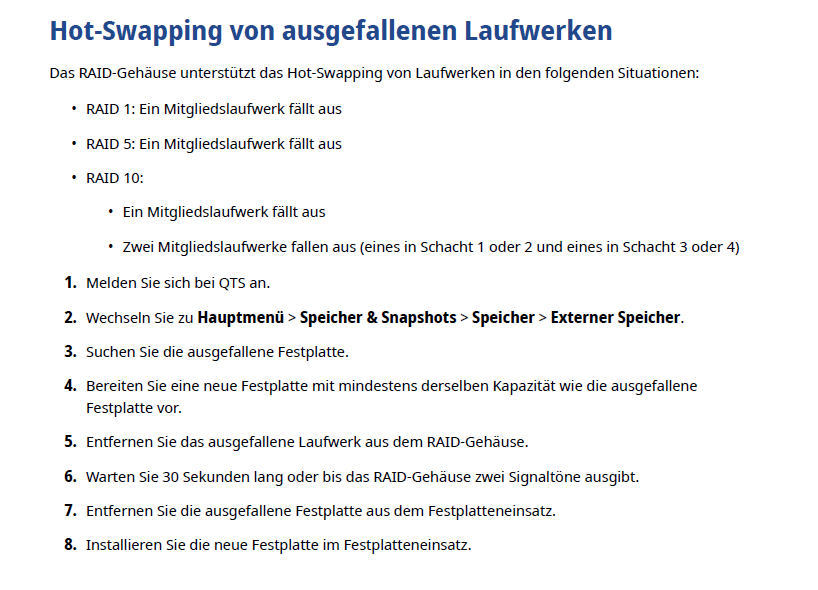
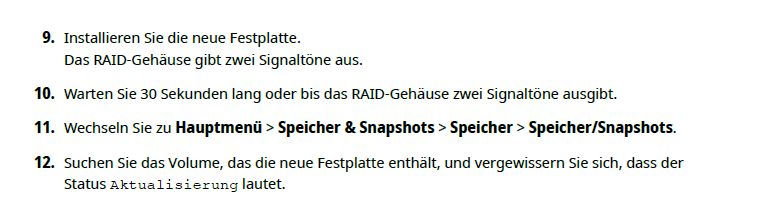
I still have another question. If the TR-004 is running with 4 hard drives in RAID 1/10 and then one hard drive fails or needs to be replaced, can you simply remove the defective hard drive and insert a new one of the same size or larger, and everything will continue to work without any problems, or is there something specific you need to pay attention to?
In the past few days, I have been looking into the TR-004 even more closely and have noticed a few things. Could someone please confirm if I am correct here?
A hardware RAID 1 only works with two drives on the TR-004. As soon as you install 4 drives, it becomes a hardware RAID 10. Did I understand this correctly?
I have equipped the TR-004 as follows: Bay 1: 8TB, Bay 2: 8TB, Bay 3: 3TB, and Bay 4: 2TB. As a result, about ~3.7TB is recognized when set to hardware RAID 1/10.
Then I swapped the drives around: Bay 1: 8TB, Bay 2: 3TB, Bay 3: 8TB, and Bay 4: 2TB. But here too, it recognizes ~3.7TB. I don’t understand that.
I would have expected that with RAID 10, it would show me about ~2TB with the above-mentioned drives, since that’s the smallest drive.
With four 8TB drives, about ~16TB storage capacity would then be displayed with hardware RAID 1/10. Correct?
With a software RAID, you can of course combine the two 8TB drives into a RAID 1 and the 3TB and 2TB drives into another RAID 1, that works.
However, I always thought that a software RAID is the worse option compared to hardware RAID. I always thought that the RAID software has to be installed on the computer (Windows).
Could I connect the TR-004 with a software RAID 1 setting to another Windows computer, or completely reinstall my own computer, or connect it to a Linux machine, and would the RAID configuration then also be recognized? Or does the QNAP software also have to be installed?
What is the advantage of a hardware RAID compared to a software RAID? With software RAID, I can combine the drives however I want.
Yes… RAID1 with more than 2 hard drives is very, very rare in the end-user sector (a waste of hard drives). The TR004 also does RAID5 (more sensible than RAID10).
In a RAID, the smallest drive always counts… so a RAID10 with 4x2TB and 50% drive waste… that adds up.
Correct, and with RAID5 you get 24TB.
With the TR in multiplier mode and software RAID, unplugging and swapping the host is only possible to a limited extent (it depends on whether the host supports it).
In your case, no advantage and also a waste (since there are cheaper pure port multipliers… without RAID).