I have a TS-219p. Had 2 X 1tb drives mirrored. Wanted to upgrade to 2 X 2tb. Change one disk to 2TB hoping it will mirror and then I can update the other one. It didn’t and it ended up with an empty disk, luckily I had taken backup. Put the second disk in and copied everything from the back up and added more data from other nas drives. today I realised that they may not Mirrored as it say disk 2 not mounted and gives me option to format it. How can I add this disk as a mirrored to disk?
Can you post some screenshots?
On these old NAS is mostly easier to start from scratch
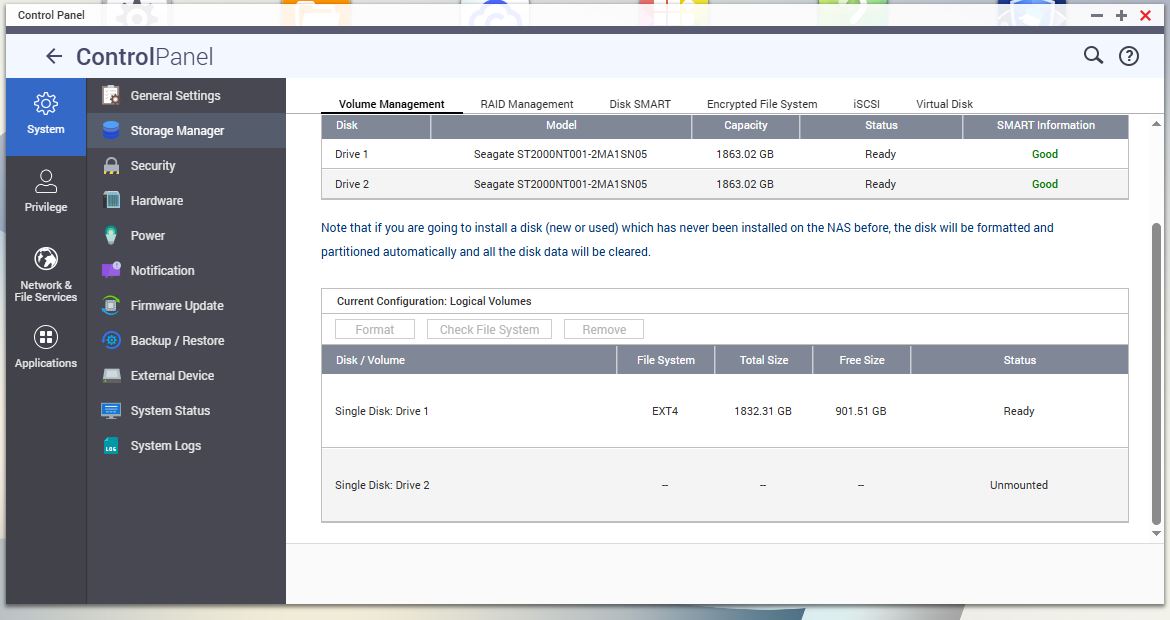
yeah two single disks
just erase both disks (diskpart / clean) and start the NAS from scratch as RAID1
The suggestion to start fresh is likely the best and most reliable way.
However using your original disks I believe would also work (but perhaps introduce some legacy issues), if you follow the guide to replace the disks 1 by 1. There is a specific process, not just inserting new drives and hoping for the best ![]()
Thanks for the reply. But we have already copied more than 1tb on it. If this the only way then so be it. I have another request which I’ll start a new case but I ask you first. We have an old system which runs on XP. There is no new development on the software which makes us one of the few people who can do this. I cannot map to our TS-219p, any ideas??
XP default SMB level is 1.0. So there should be no issue.
But in any case enable SMB2
Based on your screenshot, this appears to be a legacy volume. You may need to copy your data out, rebuild the RAID, and then copy the data back.
That said, since your device has likely been in use for quite some time, you may also want to consider upgrading to a newer unit at some point. Thanks!
But this old x19 CAT1 device will produce “Legacy Volumes” no matter if you start from scratch or not, no?
Thanks everyone. I have now backup the data and waiting for a window to start from scratch. I still have a problem that I cannot map from our Windows XP. During the mapping it says the maximum number of connection is used and I cannot see where to change or update this.
did you try changing the SMB level ?
I did check that as well. Anyway I have now taken a back up and going to attempt to add the second this as a mirrored one raid 1. I’ll deal with the XP later.
I formatted the second disk and started using migration from disk 1 to disk 2. It has been going on for 3 hours and 40 minutes and only done 33%. I hope I am on the right track. I cannot close my browser and wait till late evening to see if it is done. I wished I knew it is going to take this lone.
Yeah, it takes a long time. It’s basically doing a bit by bit copy. You don’t need to keep the browser open. Just go away and check back later.
You can log in via SSH and do a
cat /proc/mdstat
to see the progress and speed of the resync
Thanks everyone. When I try to close the browser it says you have not saved the changes. Also how does the cat /proc/mdstat work??
What browser ? What does it display ? (QTS GUI?)
Same as the SMB 2.0 enable method, I posted further up, via SSH
Raid 1 is done. I am away for a few days but I’ll deal with XP when back. Thanks for everyone’s replies.
Are you trying to map the NAS with multiple user accounts (check windows credential storage) or IP+NASNAME ?

