TS-231P suddenly all apps gone and not installable

Hello everyone,

I’m writing here because since today, or rather the past few hours, my TS-231P has been having strange problems.

Last night, everything seemed to be working fine—I watched a show on TV via Plex. This afternoon, I wanted to check something again, but Plex wasn’t working. At first, I thought the NAS had crashed, so I restarted it (via the mobile app), but the same problem persisted. So I logged in as admin via PC/web browser, and lo and behold, all apps except for Control Panel, Storage & Snapshots, App Center, Help Center, and Virtualization Guide are “gone”.

In the App Center, it looks like the other apps are not installed. Clicking the button for a specific app (e.g., Notification Center) seems to start the supposed installation, but after navigating elsewhere, the notice disappears and the queue is effectively no longer active. Even if I wait in the window, no download occurs.

A “manual” installation is also unsuccessful.

When I check “Apps installed on all devices” in the App Center, all my apps are still listed there.

At this point, I haven’t found any indication of encrypted files—so for now, I don’t think it’s a hack. I was also still able to log in as admin, and the password still worked.

The network folders are also still present and accessible.

I’ve installed the current firmware twice, once via browser access and once via Qnapqfinder—> no change.
Current firmware (5.2.9.3451) is installed.

There’s no highly sensitive data on it, just pictures and a few media files—the pictures should theoretically be backed up to the MS cloud, but still, I really don’t want to wipe the NAS and set it up again, especially when the issue is so strange (at least to me!).

Do you have any ideas?

Thank you all, hoping for a positive outcome.
If malware is suspected, was the NAS exposed to the network via port forwarding?

The loss of all apps sounds like a problem with the system volume—does it exist? (What is the overall configuration of the NAS?)

Hi dolbyman,

how can I check if the system volume has any issues?

The configuration is set up as a budget data storage “static volume”, essentially like RAID 0.

Port extensions: Port 32444 for Plex, released via Fritzbox.

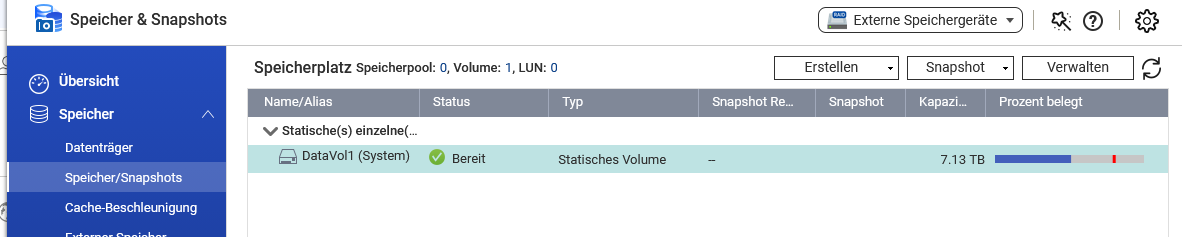
You should be able to see this in the storage and snapshots overview. If you only have one static volume (it doesn’t necessarily have to be RAID0, but with RAID0 you always have to expect total data loss—hopefully that’s clear), then this volume should be marked as (System).

I just took the screenshot, and you’re right, it’s only the one volume.

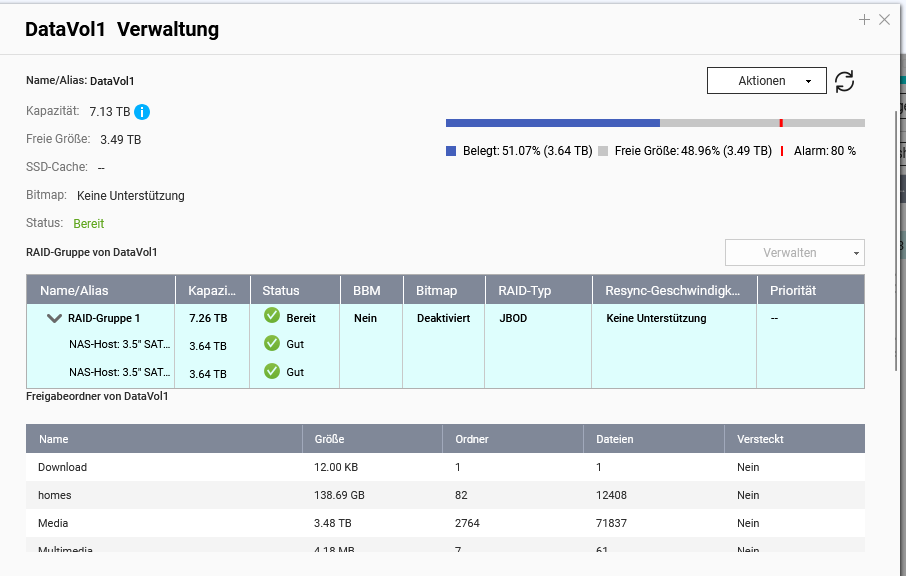
RAID type is JBOD. According to the status, both hard drives are good.

With a spanning JBOD, if a drive fails, your data is immediately lost as well.

Can you click on DataVol1 on the right and select “manage”? Installed apps should be displayed there.


This appears when I double-click on Vol1 or, similarly, when I click on “Manage”

For the apps, scroll further down in the window; they appear after the share names.

Ok, I had to restart the NAS because the app “Storage & Snapp…” would no longer come to the foreground after I ran a volume test (which completed successfully) –> then I logged out/in and the app still wouldn’t open – so it’ll take a moment.

EDIT: After the restart, it’s still grayed out after opening….

Hmm, I think it sounds like you should probably open a ticket

https://www.qnap.com/de-de/how-to/faq/article/wie-kann-ich-ein-technisches-support-ticket-bei-qnap-eröffnen

Ok, thank you very much anyway for your support so far. I have a bit of a strange feeling that after using the “Speicher und Snapp…” app it suddenly stopped working, but I’m hoping for the best.

Have a nice evening.

It’s currently midday here (Vancouver, BC, Canada) but same to you :slight_smile:

Hi, yesterday in the late evening the app strangely started working again.

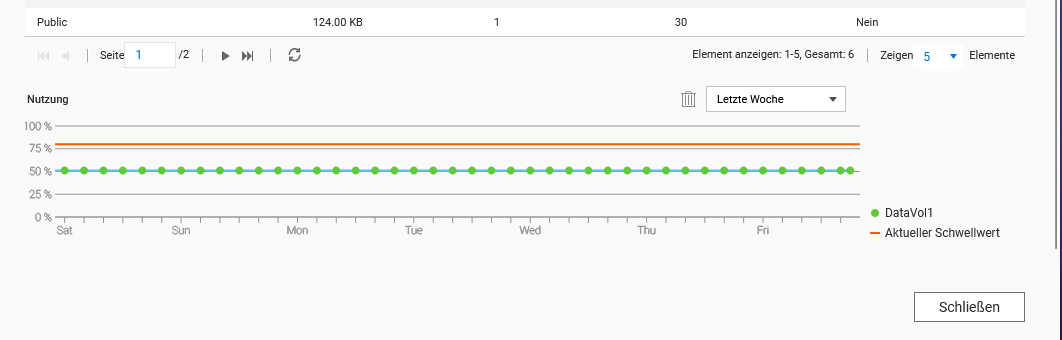
In the field below, only the partially shared main folders were listed and how much storage space is left before a warning appears. No indication of any (installed) app.

But in the screenshot above, there is still scroll space below (you can see it by the bar on the right).


this appears under the folders, no apps.

hmm… yes, strange, that would go hand in hand with the complete loss of the apps (system volume has no apps installed)

I’m curious to see what QNAP Support will say about the ticket.

–Deutsche Übersetzung von Dolbyman–

Prüfe bitte, ob es ungewöhnliche Logeinträge zum Zeitpunkt des Auftretens des Problems gibt. Falls ja, teile uns diese gerne mit! Sollte das Problem erneut auftreten, kannst du auch gerne ein Support-Ticket eröffnen. Unser Support-Team wird sich dann umgehend darum kümmern. Vielen Dank!


You may want to check if there are any unusual log entries around the time the issue occurred — if so, feel free to share them with us! If the problem happens again, you’re also welcome to open a support ticket and our Support Team will be happy to investigate further. Thanks!