After my last hard drive upgrade I decided to switch to a RAID1 array to make the next one much quicker/easier.
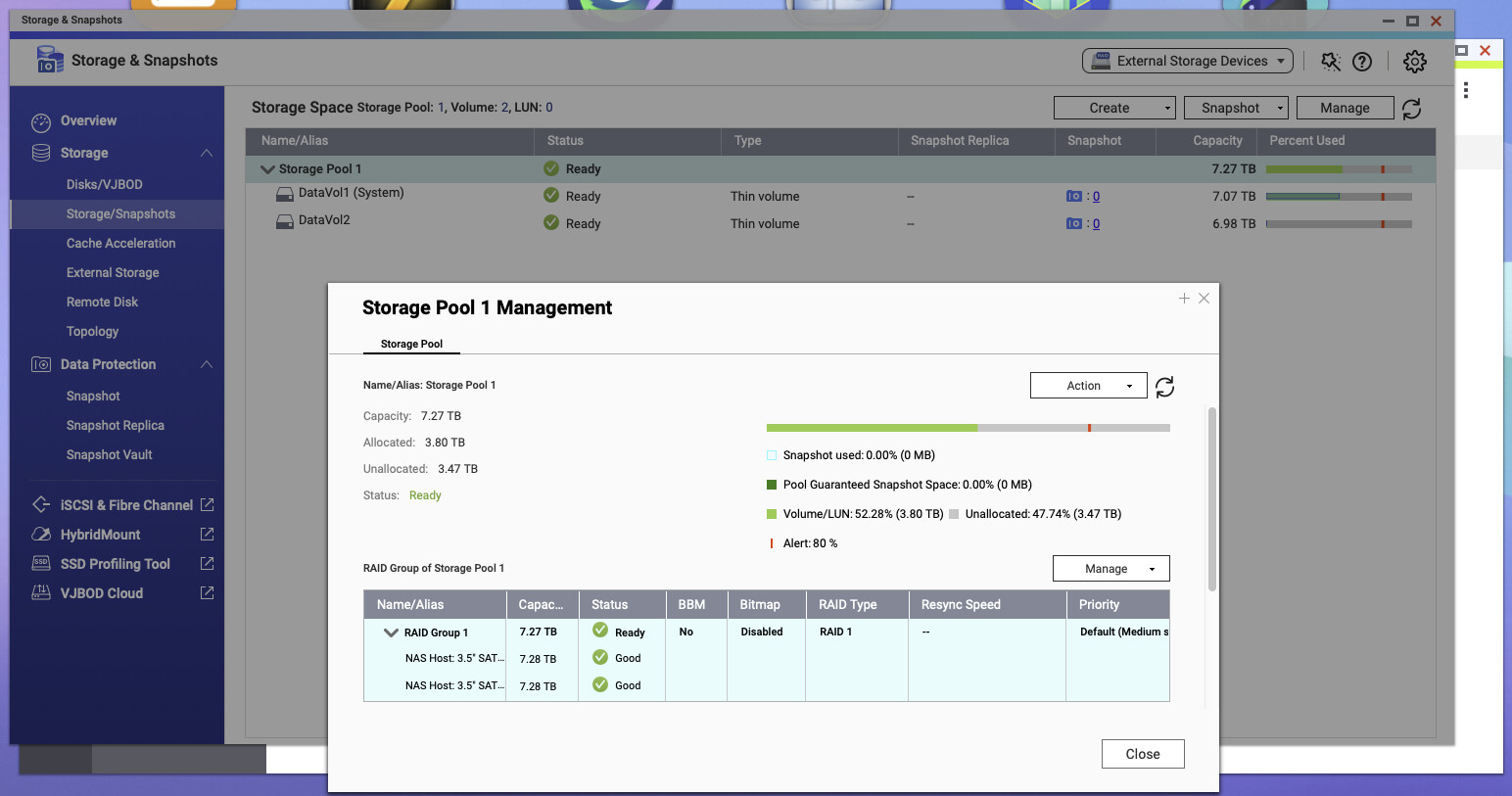
Im not sure I did it right however. Both drives were added to a RAID 1 Array, but when I look in Storage and Volumes, only my 1st drive shows 3.5TB used, the second drive in the array is completely empty. Along with this, if I open up File Station, I can see ‘Data Vol 2’ quite clearly and can use it just like I can drive 1, and when I install apps I get the option to install it on either volume.
Something tells me my RAID array isn’t using the second drive at all?? My BackBlaze bucket was pretty screwed up and had like 3 copies of every file on it, so I just spent the last week and half uploading my entire backup from scratch. I wanted to check with the community and see if this was ‘normal’ for the RAID array before I blow this whole thing away and start over. The misses wont be excited we have to wait a week before we can watch Plex haha.
Screenshot attached of my storage pool in case this matters. You can see the window in the background, shows drive 2 completely empty, but drive 1 is half full… I would think both should be roughly the same correct?
Ok I think I figured out what I did thanks to some of the comments. My last setup was two 4TB drives, one the ‘main’ drive, the other was just doing local HBS backups and then sending those to BackBlaze for redundancy. Replacing the drives meant rebuilding/redownloading the entire thing, so this time I opted for RAID1.
When I installed both drives, I think I created a volume on both, and both were created as ‘Thin Drives’ for some reason. I converted drive 1 to a Thick volume right before I posted, and started getting a warning that my system space was hitting my limit. I think what happened is the RAID array preallocated most of drive 2 to the array, so I had this odd 60GB volume left over and once I converted drive 1 to a thick volume, that tiny space on drive 2 was ‘full’. Couldn’t convert it to a thick volume (it would only let me set it for 60GB) so I ended up ‘Removing’ the second drive and reinserting it, but it rebuild the array exactly the same. This morning I just wiped out the array, created a new array from scratch and let it build. I started pulling my stuff back from my Backblaze bucket before I left so in a couple of days I should have everything back.
Now it makes sense why I was seeing Data Vol 2 in File Station. Now I just have the array with both drives, and ONE volume on drive 1 to avoid confusion. I’m guessing everything WAS in fact working, but being able to ‘write’ to the second drive threw me off. After converting it the first drive, I thought I really screwed it up haha.
“ONE volume on drive 1 to avoid confusion.”
→ If you still have a RAID 1, your volume is on BOTH drives.
Your Drive 1 and Drive 2 have the same data. That’s the purpose of RAID 1.
@Monotremata you have a lot to learn about RAID arrays and why you use them.
Hard drives fail. Period. They are mechanical devices that are spinning at more than 7000 revolutions per minute. Stuff happens.
A RAID array adds redundancy so that if a drive fails you have all your data on at least one more drive and can then add a new drive and keep going.
In a RAID, there is no “main” drive. All drives are used. You can create volumes within that array. So maybe you are confused between volumes and drives. Very different things.
But for the way you explain it, you seem to not be using RAID at all. I would highly caution against that just as I would caution against using a RAID 0 array (says the guy who has a RAID 0 array in his NAS but has no real important data there). I speak from experience. About 15 years ago, I had two 1.5 TB drives in my MAC Pro that I put into a RAID 0 array. Guess where my data is today - all the Final Cut Pro projects that I was working on, etc. It’s gone. History and sitting in a landfill somewhere. I had no backup to speak of (or that I can find today) and I thought to myself, “It’s OK. They won’t fail.” Well, they did and work I had is gone.
I would HIGHLY recommend using thin volumes. Thin volumes allocate space to the volume as you need it. Very flexible and allows you much better flexibility than thick volumes.
You are not creating volumes on specific drives. If you have RAID1 then ALL data is mirrored on both drives. That’s why it is called a “Mirror.”
If you’re willing, after you’ve finished configuring your RAID, could you please provide a screenshot of your setup (just like the one you posted in your first message)?
Additionally, are you planning to use the snapshot feature?