I’m trying to work out whether my QNAP TS-264 can be configured to do something a little different from a normal NAS setup.
I have installed a 5 GbE network card in the PCIe expansion slot of my QNAP TS-264. The 5 GbE connection between the PC and the NAS is already working correctly.
Its existing 2.5 Gb connection to my normal LAN/router
A 5 Gb connection directly to JohnsPc
JohnsPc would have only the one 5 Gb Ethernet cable connected to it
What I would like to achieve is for the single 5 Gb connection between JohnsPc and the TS-264 to carry both:
High-speed NAS/file transfers at up to 5 GbE
Internet and normal LAN traffic, with the TS-264 effectively routing that traffic through its 2.5 Gb LAN connection.
I’ve already tested the physical arrangement. The 5 Gb PC-to-NAS connection works, but if I unplug JohnsPc’s existing 2.5 Gb LAN cable, JohnsPc immediately loses Internet access — which is expected at present.
My question is:
Can the TS-264 be configured to route/NAT traffic between these two Ethernet interfaces so that JohnsPc can use the single 5 Gb connection for both high-speed NAS access and Internet/LAN access?
I’m running QTS 5.2.9.
If this is possible, I’d particularly like to know whether it can be done using the normal QNAP/QTS networking facilities, and whether there are any issues with SMB/file sharing or routing that I should be aware of.
For personal curious, what’s the intention to isolate JohnsPc from the normal LAN? You just want to make sure the transfer to NAS is fast, and the JohnsPc has only 1 network interface or for wiring simplicity?
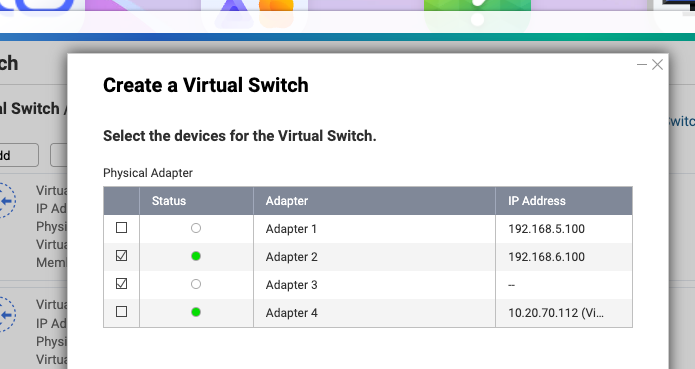
When the goal is for cable simplicity, I will suggest just create a virtual switch in NVS to “bridge” the 2.5G LAN and 5G LAN adaptor into same virtural interface. Instead of using (nested?) NAT and setup static route.
Keep the PC connected to the 5Gb interface, and with the bridge, the traffic from LAN can be bypassed like a switch will do.
And you will keep the PC having the LAN IP. While the connection between your PC and NAS is keep at 5Gb. Below is a sample:
I would only use that software definded switch in a pinch, as your PC networking would be dependent on the NAS running,so NAS reboots or downtime would also prevent that PC from connecting to the rest of the network.