How to directly connect TS-431X3 and TS653A with a LAN cable

Thank you very much. My name is Mayumi Sato.

I own both the TS-431X3 and TS653A, using the faster TS-431X3 as my main unit and the TS653A as a backup machine for the TS-431X3.

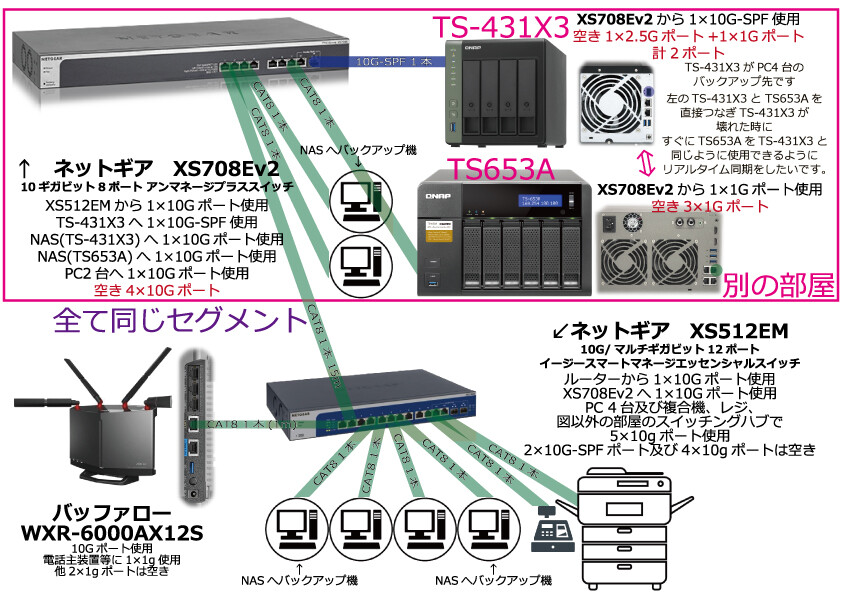
On the TS-431X3, I have created Pool 1 with two 8TB HDDs (RAID1), and Pool 2 with two 16TB HDDs (RAID1). I am using only the 10GbE SFP+ Ethernet port, and my router is the Buffalo WXR-6000AX12S. The connection from the router to the TS-431X3 goes through two Gigabyte switching hubs (XS512EM and XS708Ev2). The TS653A is set up in the same way, with only Ethernet Port 1 connected to the same segment. The TS653A is placed right next to the TS-431X3. All cables, including LAN cables (CAT8), support 10Gbps.

Currently, I am synchronizing folders from the TS-431X3 to the TS653A in one-way sync using HBS3, so that if the TS-431X3 fails, the TS653A can be used immediately as a replacement without restoring from backup files. Is there a recommended method that is better than the one I am currently using?

I tried the method described in the URL below, but the communication speed did not improve.

I would appreciate it if you could advise me on how to use the available Ethernet ports to increase the communication speed for one-way synchronization between the TS-431X3 and TS653A.

moved from English to Japanese forum

@sato

There are many characters involved, and I’m not confident that I have an accurate image of the network status. Would it be possible for you to provide a simple network diagram or something similar?

Since the TS-653A only supports 1GbE, I suspect that the network might be the bottleneck, but in reality, which part is actually causing the bottleneck?

If we could see the backup (sync) speed displayed in HBS, or the status of the resource monitor during backup, that might help clarify things.

Possible scenarios include…

  • There are many small files, and since the TS-431X3 is configured with HDDs, the read speed itself is the bottleneck.
  • The TS-653A only supports 1GbE, so the network is the bottleneck.
  • The CPU of the TS-431X3 is the bottleneck.
    I think these are some of the possible patterns, but depending on which pattern applies, the countermeasures will also change.

Since it’s SFP+ and RJ45 1GbE, direct connection might be difficult, but are you currently considering a direct connection?

Thank you for your reply, Harinezumi.

Currently, I’m not experiencing issues with slow speeds after connecting; I simply want to achieve the fastest one-way sync from the TS-431X3 to the TS-653A.

Where exactly is the bottleneck occurring?

Let me answer just in case.

Considering the current bottleneck, since the backup data from all three PCs goes to the TS-431X3, I believe the bottleneck is the 10G port on the TS-431X3.

When thinking about the bottleneck between the NAS devices, if I connect the NAS devices directly, they will be on a separate segment, so if I had to say, the bottleneck would be between the TS-431X3 and TS-653A?

If I connect the NAS devices through the same segment as the PCs instead of directly, as you pointed out, I think the 1G port on the TS-653A would become the bottleneck.

Are you currently considering a direct connection?

Yes, after trying various things…

I connected the TS-431X3’s 2.5G port and 1G port to the TS-653A’s two 1G ports using two CAT8 cables, set up LAC (Balance-rr, as this was the only option), and used MUT9000. When I measured the speed from the HBS RTRR server, it reached over 200mb/s. The NAS devices have IPs set outside the segment shown in the connection diagram below. My concern here is that this connection is said to be supported only for VJBOD. Although it gets disconnected several times a day, since I have 10TB, even after two days the one-way sync isn’t complete, but so far, aside from occasional disconnections, there haven’t been any other issues. I’m worried because I don’t have any knowledge about VJBOD.

I also tried LAC through a switching hub (not compatible with 802.3ad), but the speed was the same at 200mb/s. However, since other data also passes through this route, I chose to connect the NAS devices directly.

I want to know if my connection method is correct.

How is everyone else doing it?

Below is the connection diagram when the NAS devices are not directly connected.

Below are the speed measurement results.

Regarding synchronization methods, when I search online, there are so many ways to make the backup device immediately usable like the main NAS if the main NAS goes down, that I can’t tell which is best. Even with QNAP NAS, there are options like HBS, Qsync, VJBOD, synchronization using File Station, etc. To be honest, I want to know which is optimal for my case.

1 Like

@sato

I understand the situation. Thank you!

  • In terms of networking, connecting the two RJ45 ports using Balance-rr should be the fastest method of communication with the cards you have.
  • If both devices have their MTU set to 9K, I believe you have the fastest configuration.
  • Also, directly connecting the NAS units is correct in terms of eliminating the possibility that sync traffic on the main network could interfere with other communications (or vice versa).

To clarify the available methods:

  • Qsync is used for synchronization between NAS and clients, so it cannot be used in this case.
  • VJBOD is used when you want to combine free space from other NAS units. It cannot be used for synchronization purposes.
  • File Station does not have a synchronization feature.

Therefore, I think the method you currently have set up is the fastest for your environment.

You could also use the method of “mounting with NFS and syncing by copying via command line,” but from the second sync onward, you would need to scan all files, so subsequent syncs would be slower.
HBS (though I haven’t checked the implementation) likely uses mechanisms like inotify to list only the files that have changed and sync only those, so after the initial full sync, it should be faster than other methods.

Since you’re getting 228MB/s, I believe you’re reaching the theoretical maximum for dual 1Gbps connections.