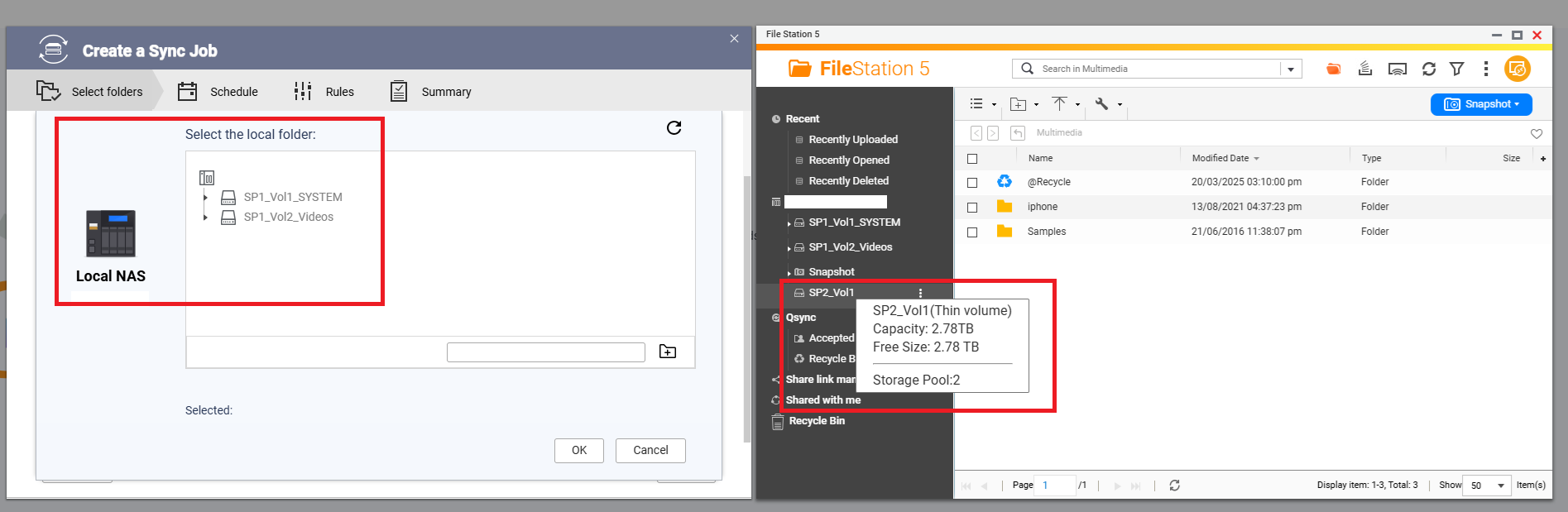
I cannot select my newly created LUN called SP2, like in the screenshot below.
HBS3 cannot select it, but the FileStation can show it properly.
Storage & Snapshots shows the LUN is ready, but as a Thin Volume:
Any help would be greatly appreciated.
Thanks.
Hi,
HBS is a file-based backup and sync application. It is designed to back up shared folders and files from the NAS.
A LUN, however, is block-based storage used by iSCSI/FC hosts. Because it is not handled as normal file/folder data, HBS does not support selecting or backing up a LUN directly.
For LUN protection, we recommend using Snapshot Replica instead. This is the appropriate method for replicating LUN snapshots to another QNAP NAS and provides a safer recovery option for block-based storage. https://www.qnap.com/en/how-to/tutorial/article/save-snapshots-to-other-qnap-nas-with-snapshot-replica
In short:
Thanks.
@JackWang ,
May I know how I can reconfigure this newly created RAID-1 to be used by HBS3?
Because the goal here is to use for backing to OnPremise from a cloud SaaS storage.
NA9D
May 8, 2026, 10:58pm
4
Recreate it as a regular volume and not a LUN.
In File Station, click the three-dot menu next to “Your Volume.”
Select “Create a Shared Folder.”
After the folder is created, you will be able to select the corresponding folder in HBS.
That’s right, thank you so much, @JackWang and @NA9D