I have a TS-253Be running F/W ver 4.5.4.2790. I’m running two 6TB drives in RAID 1 and I’m close enough to capacity that I need to get serious about either replacing the drives one at a time capacity or upgrading the NAS & increasing capacity.
Is it possible to move my drives over to a TS-664, install two new drives, and convert to a RAID 5 without needing to start over? I was hoping to move the drives over, power up the new NAS, have a working system, then install two new 4TB drives (it’s what I can get), convert the Storage Pool to RAID 5, and end up with 12TB of capacity. If not, I could always start up a brand new setup and transfer the files from backup.
I’m thinking I’ll need to eventually start running ver 5 firmware because a lot of my apps are outdated because the newer versions won’t run on ver 4.5.4.
First, if I were you, I would spend an extra $100 and buy a TS-673A. You can go up to 64 Gig of memory, the CPU is a little bit faster, 2 PCI slots, it can run QuTS Hero, etc. But only you can decide on what you can afford.
Second, I don’t think it’s possible to upgrade a RAID1 to a RAID5. It’s a completely different sort of storage architecture. So you will really need to back up your data, wipe your drives, create a new pool that is RAID 5 and off you go.
And since we are probably a few months from QTS 6 being out, yeah, I would update.
I think all I’ve ever used is version 5. So yeah, there’s no issue upgrading.
I was not aware that QNAP provided a way to migrate to a different RAID format. Nice. So that makes it easy for you. If you are going to do that, then I would definitely upgrade to 5 first…
I won’t be able to do what I have planned unless I can add two drives to the array at the same time. My 2-bay is set up as a RAID 1 with 6TB drives. I’m only able to get 4TB drives in the make & model I want (I’m trying to save money too) so I was going to use two 4TB and two 6TB drives for a 12TB RAID 5. The instructions lead me to believe I can only select one drive at a time to add to the array. Adding a 4TB won’t work, but adding 2x 4TB at the same time might work. Of course I’m first going to transfer the 2x 6TB drives to the 6-bay.
I guess a worst-case scenario is I have to start from scratch and transfer the data from my backups. This would actually let me install 2x 512GB M.2 SSD’s as a RAID 1 to use for the system and apps. Or is 512GB unnecessarily large?
Now to decide between the TS-664 and the TS-673A. I heard the 664 is stuck at 8GB RAM because it is now soldered on instead of in slots.
Yeah, the instructions state they need to be the same size or larger
To do this, the following is required:
Prepare hard drives of at least the same capacity as existing drives in the current RAID array.
Now what you could do is install your two 6 TB drives, then add your 4 TB drives. Set up the 4 TB drives as a RAID1. Copy data from the 6 TB array to the 4 TB array. Then remove the 6 TB array as a storage group. Wipe those drives. Then do your migration. It’s an extra step but should work…
No, 512 is the smallest I would go. The NVME drives look like a normal drive. So you can store some stuff there. Your home folder will be there…It does help…
It all depends on what is important to you. The 673A doesn’t have an HDMI output. I don’t think that’s important. The 673A has slightly more horsepower (they are very close):
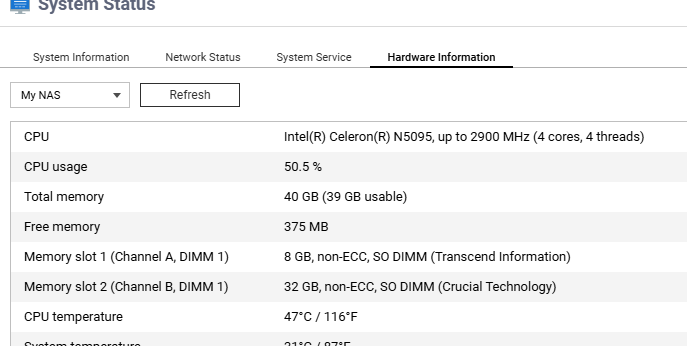
I think performance is nearly identical. The QNAP website says the TS-664 supports a maximum of 16 GB memory but @Becker2020 just said he is running 40 GB (hmm… I always thought memory had to be installed in matching pairs - he’s certainly not doing that!).
The TS-673A has a built in power supply while the TS-664 has an external power supply.
The storage capacity is based on the smallest drive.
You can only add drive at least of the same size as the smallest one.
So in your case, you cannot add any 4 TB drives. You would need to get at least 6 TB drives.
Or, as someone else suggested, setup the RAID 1 with 4 TB drives on the new NAS, copy data from the old one (if less than 4TB..), then add the old disk to the new NAS to migrate to RAID 5.
Great suggestion about creating the 4TB RAID 1. That would definitely get me where i want to be, but how can i install the system on NVMe drives? I’d like to eventually buy a pair and set them up as a RAID 1. Is it even necessary to set up a SDD as a RAID 1, or is a single SDD just fine? I’d rather spend the money in steps. 2x 4TB drives and a new 6-bay NAS. Get it migrated to a RAID 5. Then add NVMe drives later and somehow move the system over and use the HDD’s for the bulk data. Then maybe add another 4TB and migrate to a RAID 6.
I’m not even using the home directory. I don’t know what it’s for. I created some shared directories and then I mapped drive letters to them from my Windows machine. I need to learn how to set up my NAS properly.
I like the smaller footprint of the TS-664, but for very little more $, the TS-673A is probably a more professional model. Am i correct in that idea? Do I need a GPU to transcode videos?
To set things up with the NVME drives as the system volume, I believe you will need to start from scratch. That’s what I did when I added them to my units. You will need to install the NVME drives then remove all your other drives. Then follow guided setup. I don’t think you can then just install your existing drives because those drives think they are the “system” volume. There will be conflicts. Someone else can confirm this but I am pretty sure that is what I was told when I wanted to do it.
I would always use two drives in RAID1 for that volume. If you are using just one SSD drive and not goes kaput, it’s a lot of tears and work…
The TS-673A is definitely a more professional model. There is no GPU (or video card) in that unit, but there likely isn’t a GPU in the TS-664 either. It may have an “Intel Video” output but that’s not seen as a GPU. You don’t really need a GPU to transcode videos. It speeds things up but it’s not 100% necessary. Still with the TS-673A, you can add a GPU as it has two PCIe card slots. Not sure if you can add a GPU to the TS-664 - check the compatibility guide. Personally, I found the GPU was of little use to me.
I’ve been slow to pull the trigger and I think that might be a good thing in this case. I think I’d probably be better off buying a single 8TB drive.
Transfer my two 6TB Irongate drives to a new 6-bay.
Add an 8TB Irongate Pro (it’s what I can get) to the 6-bay and add it to the Storage Pool.
Convert to RAID 5 for a total of 12TB.
Same outcome, but easier and less steps. It will be the same cost too.
Are there any negatives? Drive sizes on a RAID 5? I could eventuality add another 6TB or 8TB drive and convert to a RAID 6 if that would help. Two 8TB drives at $200 each to eventually be a RAID 6 would cost more than three 4TB drives at $100 each. It does leave more open bays for expansion though.
Generally no real reason to go to RAID6. It adds an extra layer of data security but it adds extra cost. If you are worried about costs, stay with RAID 5.
Wha you are saying will work fine. You will lose 2TB in that 8TB drive, but it will work fine.