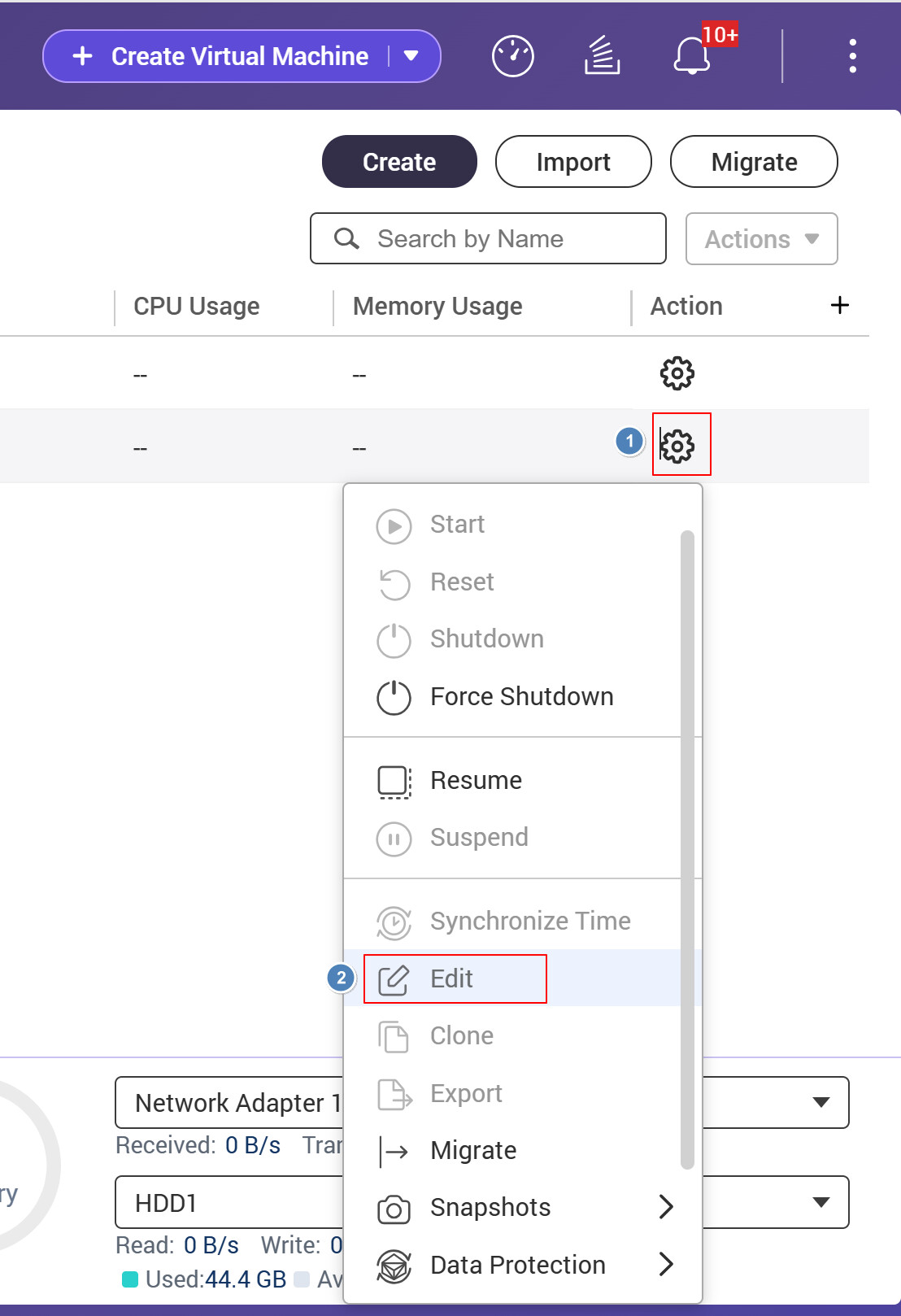
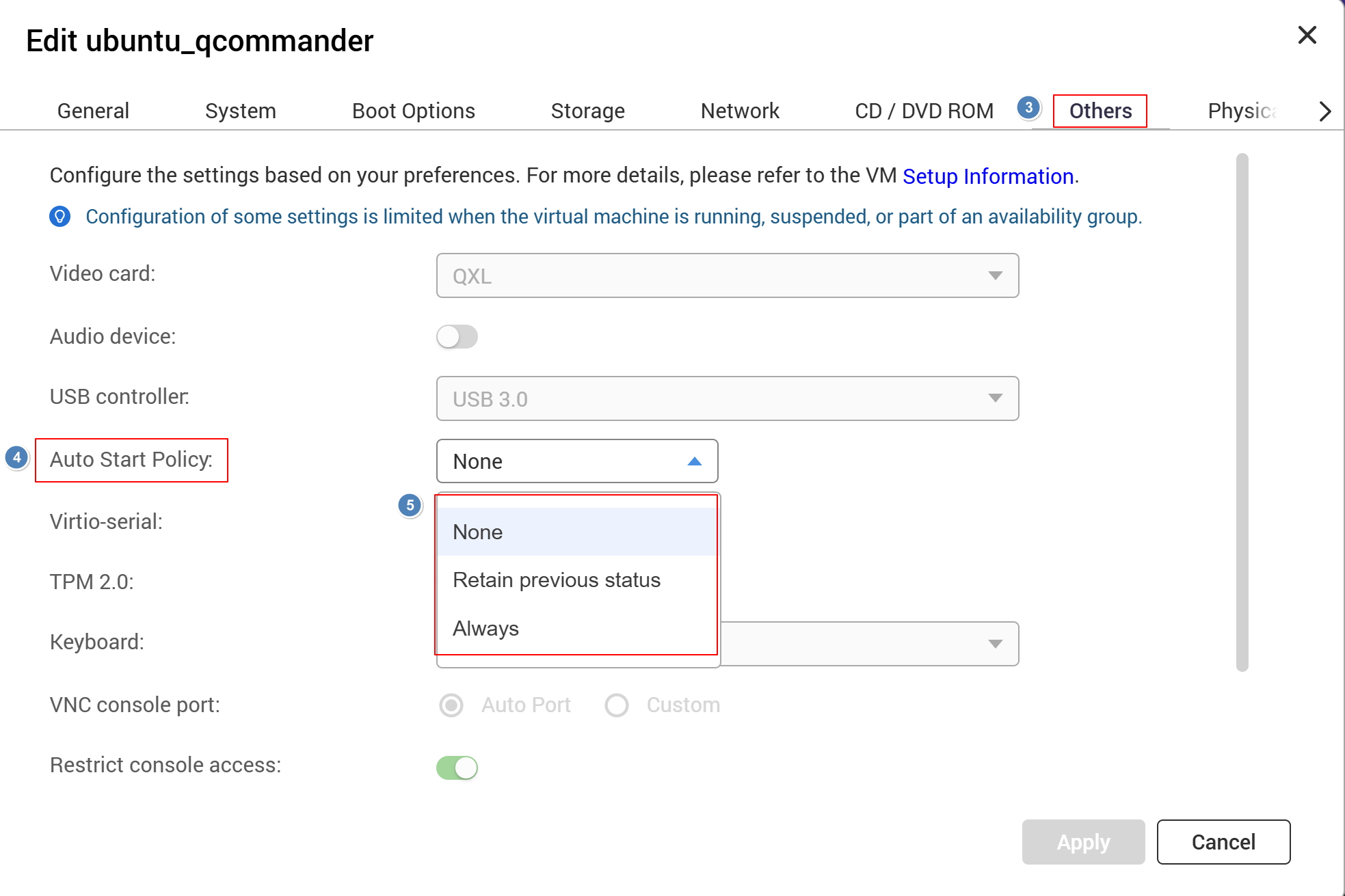
I recently upgraded to QTS 5.2.9 and noticed an issue with my VMs during the firmware upgrade process:
When QTS reboots for the upgrade, the running VMs are not gracefully shut down. They appear to be force-killed.
After the reboot, VMs that were previously running are not automatically boot.
I have important services running inside these VMs, so this causes unexpected downtime. I’d like to keep auto-update enabled to stay on the latest firmware, but the current behavior makes it risky since I never know when an update will reboot the NAS and disrupt my VMs.
Is there a setting in Virtualization Station to ensure VMs are gracefully shut down before a system reboot, and automatically restarted afterward? Or is this a known limitation?
Thanks for the suggestion! I’m aware of that option, but I’d prefer to keep auto-update enabled — running outdated firmware is a security risk, especially for a NAS exposed to the network. I don’t want to miss critical patches just to keep my VMs safe.
Ideally QTS would gracefully shut down VMs before an update reboot and auto-start them afterward. Does Virtualization Station or QTS already offer this kind of functionality? If not, I might need to write my own script to handle it.
If you have your NAS exposed to the internet, we would highly recommend against it! You have been warned!
As for upgrading - here’s what I have found and learned:
1.) Best to be notified and not do it automatically. We have had instances where upgrades have been pulled back.
2.) When manually doing the upgrade, you now have the ability to manually shut down all your VMs, containers and all instead of it happening during the process.
3.) When manually upgrading, QNAP first tells you that your NAS has been running for a long time and ask if you want to reboot before upgrading - DO THIS!!! I have had problems upgrading when you have long running processes that get upgraded. Best to reboot and make sure all is clean before upgrading.
The time difference between an automatic upgrade and you getting notified of an upgrade is small. If you have chose the risky approach of exposing your NAS to the internet, that time is not going to make much difference as you have had extreme risk anyhow…
Thanks for the detailed advice! Two of you have now recommended switching to “notify only,” so I’ll make that change and try to adopt this upgrade process in my workflow. I’ll also move my NAS behind the local network to reduce the security risk. Appreciate the tips!
Regarding the auto-start policy behavior for your VMs, here is an explanation of the two policy options:
Retain previous status: When this is selected, the VM will return to its previous state after a FW or QVS update and reboot. This means if the VM was Powered Off, Paused, or Powered On, it will remain Powered Off, Paused, or Powered On respectively after the update.
Always: When this is selected, regardless of whether the VM was Powered Off, Paused, or Powered On before the update, all VMs will be automatically transitioned to the Powered On state once the system or QVS app restarts.
We hope this clarifies the expected behavior and helps you choose the setting that best fits your needs. Thank you!
Thanks for the clarification! The auto-start policy is helpful — I’ll set it to “Retain previous status.”
One follow-up though: is there an option to control how VMs are stopped when the NAS reboots? Currently it seems like VMs are suspended by default, but in my case, a full graceful shutdown would be preferable — my services may not function correctly when resuming from a suspended state since the network environment may have changed after the reboot. Even just sending an ACPI shutdown signal to the VMs before rebooting would be sufficient. It would be great if users could choose between suspend and shutdown as the pre-reboot behavior. Thanks!
I’m running a self-implemented message broker (similar to RabbitMQ) inside the VM. It maintains active connections with clients and may be in the middle of processing messages at the moment the VM gets suspended. Resuming from that suspended state could result in half-processed messages or stale connections.
I know I could implement retry and timeout mechanisms on the service side so it reconnects after VM resuming, but that adds complexity. A simpler and more reliable approach would be for the system to send a shutdown signal to the VM before reboot, so that the service can finish processing in-flight messages and close connections cleanly.