A long time ago, I set the max size of my TimeMachine folder way too high (3TB) and would now like to shrink it to a more manageable 2TB. I will start by deleting some old backups from the Mac side to reduce the actual space taken to below 2TB (it’s currently at 2.8TB).
Question— Once done, can I then set the max size of the TimeMachine folder down to 2TB (in the HBS3 app) without issue?
Note-1: Once the folder is shrunk, I’ll let TimeMachine handle the space purging as it needs.
Note-2: I also do backup to external drives once / twice a month - the NAS backups are really to capture frequent incremental changes rather than full snapshots.
First of all what NAS do you have and what operating system.
Did you set up the TimeMachine backup location as a volume? If it’s a thin volume you can easily change the size and shrink it. If it’s a thick volume, I am pretty sure you cannot do that.
Thanks for the reply. I should have added the detail, so here goes…
TS-431P, 4-bay with 4x 4TB WD40 drives set in 2 raid-1 static volumes. Running QTS 5.2.10.3568 (just updated today). And my Mac is running OSX Tahoe 26.5.2 (latest version)
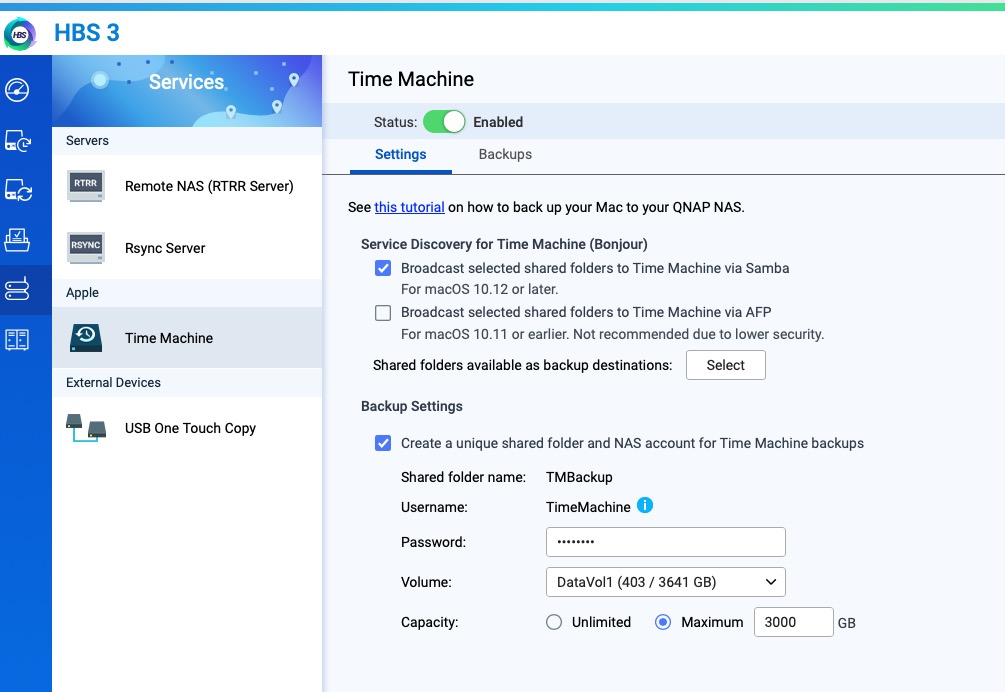
I’ve configured the TimeMachine service within HBS3 and I believe it just creates a shared private folder. What you can also do within HBS3 is tell it the maximum size that the TM backups can take in that folder (which I think makes the Mac-side TimeMachine think it’s working with a network-attached volume of that size so will purge space as needed (as it would do with any fixed-size volume). In short, I don’t think the backup location is a volume (thick or thin) at all.
I’ve got a screenshot to illustrate - hopefully I can upload it!
The Time Machine destination that HBS 3 creates is a shared folder TMBackup, created on whichever volume you select.
The Capacity → Maximum value in your screenshot is applied as a limit on that shared folder. It’s a setting you can adjust up or down as needed.