My QNAP is a TVS‑H874 with an Intel Core i5 12th‑gen and 32 GB of RAM.
My current firmware is QTS Hero 5.2.9.3410.
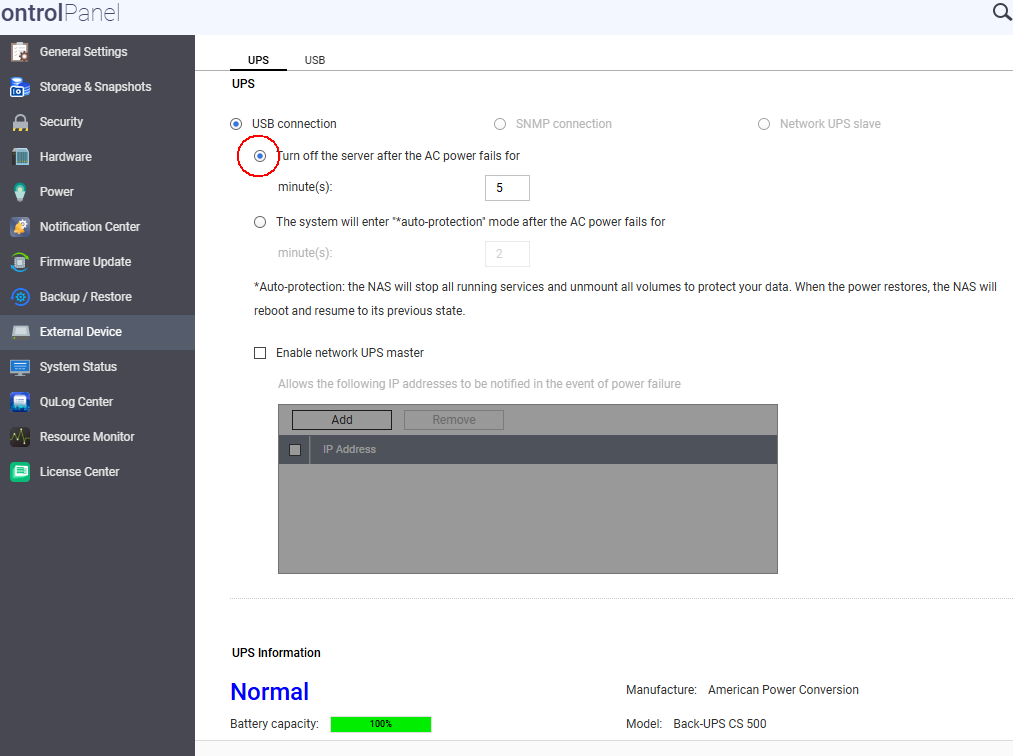
During some storms in my city, my NAS was subjected to power failures. At one point, the power went out and came back up quickly (within less than 10 minutes) three or four times. The NAS is connected to a powerful UPS via USB. This UPS notifies the NAS when a power failure occurs and also when power is restored. The system was configured to shut down the server after 5 minutes of power failure.
On that day, the system entered shutdown mode, then the power came back up. It then entered “cancel shutdown” mode, but then the power went out again. This happened several times during the day. The NAS never experienced power loss. The UPS kept it powered corretly all the time.
After this event, the NAS started to show a symptom: when the system is shut down and then powered back on—whether because of a power failure, a reboot, or a firmware update—the web services no longer start correctly. If you try to log in to the administration page, you get the message “Error 500 – server not available”.
The only way I found to bring the NAS back into operation is to log in via SSH as administrator and manually stop and restart the services using the following commands, in this exact order:
bash
cd /etc/init.d
sudo ./Qthttpd.sh stop
sudo ./thttpd.sh stop
sudo ./thttpd.sh start
sudo ./Qthttpd.sh start
After running these commands, it becomes possible to log in again, and services such as Qsync are also restored.
I opened a ticket with QNAP support, but they did not seem very interested in the problem. Their suggestion was to back up the data and reset the NAS to factory defaults, then start from scratch—as if this were some kind of entertainment device, a gaming PC, or something similar.
Steps that were tried without success:
-
Re‑configuring the network interfaces because Perplexity, analyzing the logs, suggested that the service was taking too long to start up due to an IP being configured on the physical interface.
→ Done, but it did not fix the issue. -
Manual re‑installation of the firmware.
-
Re‑installing the firmware following the step‑by‑step instructions in the “firmware recover” document on QNAP’s support website (twice).
There were several remote access sessions by QNAP support, but they were unable to even determine the root cause of the problem.
I believe that if I completely reset the NAS, the problem will be solved. However, I would then risk losing data. Besides using the NAS simply as storage, I also run a DNS/DHCP server, a database, and a video and photo library on it. There are also many configurations, such as backups from corporate OneDrive to the NAS, email backups, and other custom settings that have been built up over time and cannot simply be backed up and restored.
All of my users are remote: they use Qsync, two‑factor authentication, etc. Supporting all of them one‑by‑one after a factory reset would be a major problem.
Even if I decided to go through this reset procedure, QNAP has never investigated or fixed the root cause of the issue, which was the incorrect way the NAS handled a rapid sequence of power interruptions and restorations. Next summer, when the storm season returns, I could end up with the same problem again.
This is a warning to anyone using the same kind of configuration that I have: if you experience repeated power failures and restorations, you have a good chance of encountering the exact same issue on your NAS.
Before I reset the NAS, I would like to know if anyone has suggestions on how I could identify what is causing these two services to fail during boot, and how to fix them.
I do not have Linux knowledge, so I am limited in what I can investigate on my own.