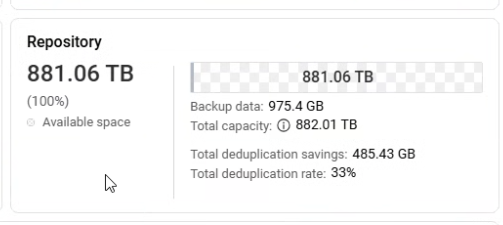
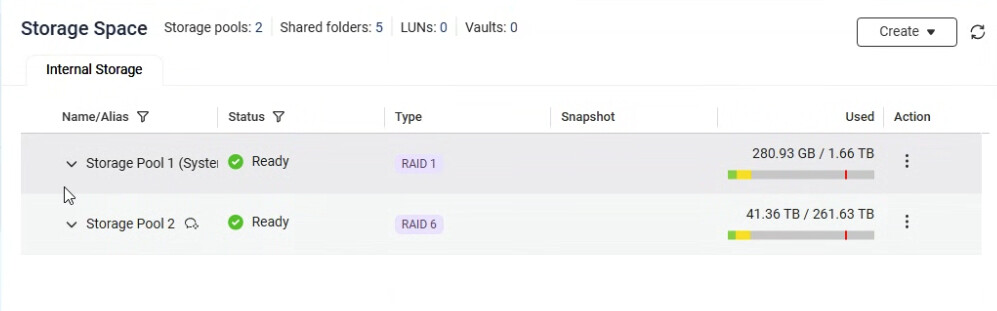
We have a brand new AI1688ATX, 192GB RAM, 2 x 1.9TB u.2 SSDs for cache, 2 x 1.9TB u.2 SSDs for Storage Pool 1, 12 x 30TB HDDs in RAID-6 that will be used exclusively for backups of network servers and VMs. After getting everything configured, latest OS, latest app updates, the NAS reports this:
First, that is an expensive NAS if all you are doing is using it for backups.
Second, are you running QuTS Hero? In hero, when you make a shared folder, you can over-subscribe the space in each folder so that your total pool size is much larger than your actual physical size.
For example, on my TS-873A, I have 4 10TB drives in RAID5 giving me roughly 27GB of space. Yet I have well over 100 TB of “allocated” capacity based on my shared folder sizes. Yes, I could get in trouble if any of my folders get that large (they aren’t close to that so I am fine). But that sot above may be indicative of you have more space allocated to shared folders than what physically exists.
Thank you for reporting this and providing the detailed setup information!
Regarding the capacity display discrepancy, our initial assessment suggests this is a reporting issue, possibly related to the HDP synchronization.
Please rest assured that while the numbers look unusual in that specific view, your system is reporting the expected capacity correctly in other areas. We are currently analyzing the root cause to provide a resolution. Since it is a public holiday in Taiwan, it may take our team a little extra time to follow up, but we are looking into it.
Thanks again for your patience and for bringing this to our attention!