How can I create an XML profile for my TV to use in the Media streaming add-on? My TV isn’t communicating correctly with the DLNA. This is usually configured by a profile. Where are these profiles stored? I found some similar files here.

But maybe they’re something completely different. Can anyone tell me?
I’m not a fan of using third-party apps (Plex) if you have native ones. In addition, due to the vast functionality of the Plex application, the settings are not always clear. I liked Twonky; it makes connecting profiles very easy. But they say there are security issues with it.
DLNA is a thing of the past. It’s been abandoned by the industry and I don’t know if the newer versions of QNAP are supporting it fully. I can see the DLNA stuff with my TVs, but frankly, the interface is so poor compared to something like Plex that I would never use it.
1 Like
I understand that DLNA is a thing of the past. But QNAP has the app I’m asking about. Moreover, it’s been installed many times. That means it’s in demand. And I’m not going to replace my wonderful TV just because the app doesn’t recognize its profile. So the question still stands.
Regarding the Plex, I understand you like it. But that’s not the question. Plex may be a great service, but I don’t need all its fancy features. And DLNA profiles simply aren’t configurable. Or rather, there’s no description of how to do it. Do you know a specific description of this feature?
Do you happen to know anything about the Serviio app? The app used to be very active. Does it work on qnap v5 now? Or is it not recommended for installation?
No need to replace your TV for plex,emby,jellyfin. You get a chromecast or other cheap streamstick…done
Guys, why do you always avoid answering specific questions and instead suggest something completely different? Thanks, but the streamstick options don’t work for me for a number of reasons. Do you have any answers about the apps I’m interested in? About Media Streaming Add-on or Serviio ? I’m also interested in the answer about setting dlna profiles in the Plex.
One of the main reasons is that my wife can’t handle new decisions. And don’t tell me your wives can handle this.
I know twonky DLNA had profiles that could be manually configured.(xml files) For Plex DLNA I would check the Plex forums, I haven’t used DLNA in 6 or 7 years.
No, our wives cannot handle new stuff! 
What happens when you try to connect your TV via DLNA as-is. In MediaStreaming AddOn you can set all the display, menus styles, etc. for each of your connected DLNA devices.
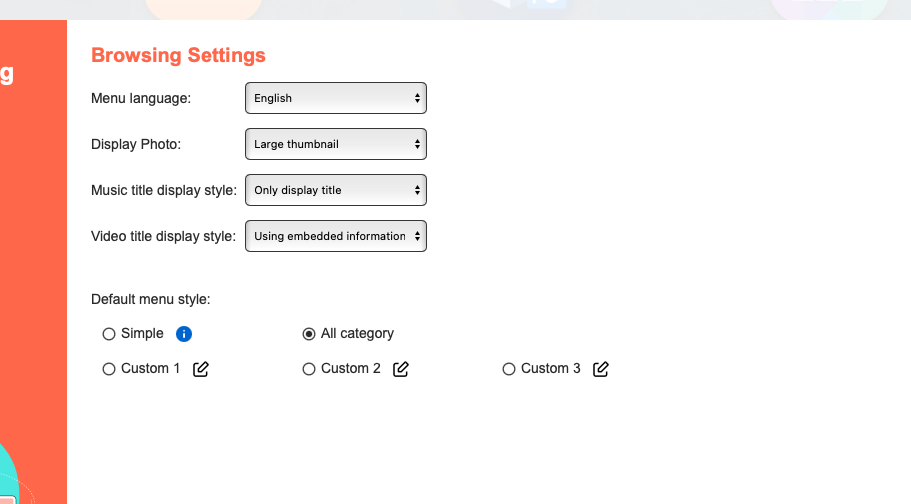
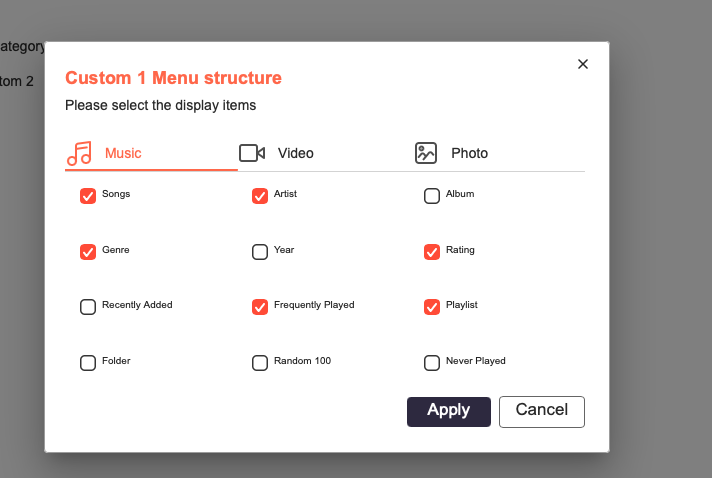
Then in DLNA MediaRenderer tab, you can select what user profile and what menu style you want for a particular device:

There’s plenty of other customization options as well like you can set different devices to access the NAS via different user accounts, etc.
Does this help with any of your questions? I’m pretty sure all these settings adjust the XML profile.
@Dolbyman. I didn’t ask about twonky, everything in it is clear to me. I asked about Plex thinking that as a fan of this program, you might know the answer to my question.. Obviously, I shouldn’t look here.
@NA9D Jon. A TV profile, which is usually stored in xml-files, is a completely different matter. The screenshot you provided shows a tree-like menu structure. It’s clear and doesn’t raise any questions for me. A profile describes the set of codecs and resolutions supported by a given TV model. When connected, the TV tells the server its model. The server finds the corresponding profile, which lists the TV’s supported codecs, and operates the server in the appropriate configuration. More advanced servers can even enable on-the-fly transcoding for a specific codec. Profiles are stored in xml-files that can be explicitly enabled (twonky), while some servers only enable them automatically, without the ability to switch (plex?). However, in both cases, this file can be edited manually.
I am a big time proponent of Plex, but I have never used the DLNA component, besides a simple test of the navigation tree. (Hence the tip to check with the Plex forum)
OK. I don’t know much more about DLNA than what I have told you. I have no idea if there are user editable XML files on the QNAP for the TV profiles, etc.
Based on a run through using the find command, the location of the XML file looks like it is going to be based on the processor of your QNAP, and whether its transcoding. I found various XML files in locations of:
/share/CACHEDEV1_DATA/.qpkg/MultimediaConsole/medialibrary/bin/config/x86
/share/CACHEDEV1_DATA/.qpkg/MultimediaConsole/medialibrary/bin/config/x86VATranscode
/share/CACHEDEV1_DATA/.qpkg/MultimediaConsole/medialibrary/bin/config/arm
/share/CACHEDEV1_DATA/.qpkg/MultimediaConsole/medialibrary/bin/config/evansportHW
As for the actual XML file you need, that depends on what TV you have and what XML file the DLNA app decides to use based on what it gets from your TV. Thats a part of what you haven’t stated - what TV you have. Do you know what profile its trying to request from the DLNA server?
These apps may have been installed many times, but, don’t forget - thats since the app became available and is over a period of many years. The Multimedia Streaming app and the Multimedia Console have been around since I got my first QNAP in 2020. They can’t possibly account for every piece of hardware thats out there, either - you may just be unlucky enough to have a TV that isn’t going to work. You’ll need to post more information about your devices in order to get any further than where you are right now.
With Plex, I know you can delete the Codecs folder on the server, and when you start the server app again, it will redownload the codecs at startup, so, its entirely likely that the app might replace any profiles you modify in the Plex install at some point, undoing any changes. I don’t know if that’d be the case for Serviio as I’ve never used it.
Have you checked the MyQNAP.ORG repository to see if there’s any apps there that might work for you? There is a Twonky app there. The security issue with it seems to be related to using API to get access to logs containing encrypted admin credentials, and they have no intention of fixing that issue which has to do with hard coded credentials in the app (and we all know why that’s a bad idea, don’t we.). Thats supposedly only an issue if you allow external access to Twonky with a port forward. Simple solution to that is don’t allow external access so don’t set up a port forward.
Isn’t the whole purpose of DLNA is that it is plug and play? That you don’t have to mess with profiles and all? I think the interface kinda sucks and all (Plex way mo betta), but I’ve never seen an instance where I couldn’t access a DLNA server from any of my TVs.
That is the point… Unfortunately, not all vendors implement industry standards “well”. The TV hasn’t been identified, so we don’t know… And vendors can be close-mouthed about how to make modifications to their apps or devices, or even how they’ve decided to implement it or what they’ve changed. Case in point, my WFM vendor won’t divulge how their software is calculations service level estimates, but it sure as hell isn’t the industry standard implementation of Erlang.
Thanks for the info. I have a Philips, one of the old models that was produced back when Philips was still making them. I installed the Serviio, and everything worked right away. And when I enabled transcoding, all the new formats worked too. I was very pleased. The lack of digital signature in the app is concerning. I had to disable that feature. What do you think of this Serviio and this feature?
I’ve never used Serviio. I use Plex, and also have remote viewers who stream content in my libraries.
Sometimes digital signatures for apps in the app store expire - they don’t last indefinitely. While its possible for apps in the app store to have malware in them, its rare. I can’t find Serviio in the QNAP App Center or on the MyQNAP.org repository, so I don’t know where you got it from? Their website says its officially recognized by QNAP and you can get it from the QNAP App Center, but I can’t seem to find it there. If its not in the App Center, then it won’t find the digital signature its looking for.