ZFS Speed problems ?

Hi,

I need help to understand how does ZFS work on QNAP 'coz it seems i missed some crucial info (I apology if this is somewhat general knowledge that i haven’t know) so please bare with me.

Here is what i did with my QNAP TS-h2477AUX NAS.

At first i had only 6 * 18TB drives (Toshiba MG09) so i made pool/volume with those 6 drives as RAID 6 (4+2 for parity 'coz i need a lot off space so i can’t go with RAID 10, too much "lost space with already too expensive TB/$ in these days) and started copying files from my Synology sicne i have a lot of data (and lot of small files/images which normaly tahe time to transfer) and i started few days ago.

After few days I got another 3 drives (same 18TB Toshiba MG09) so i can cover up same 108TB volume like i have in my current Synology NAS.
Then i Expanded my ZFS pool with those 3 new HDDs added in one go (i took about 15h to calculate/expand but it worked overnight and it was ready tomorrow) and i “gained” roughly 40TB more of space which is good/expected :).

So now my pool/volume contains 7+2 (RAID 6) and all seems to be working fine until i try to test speed and get surprised by slowness.

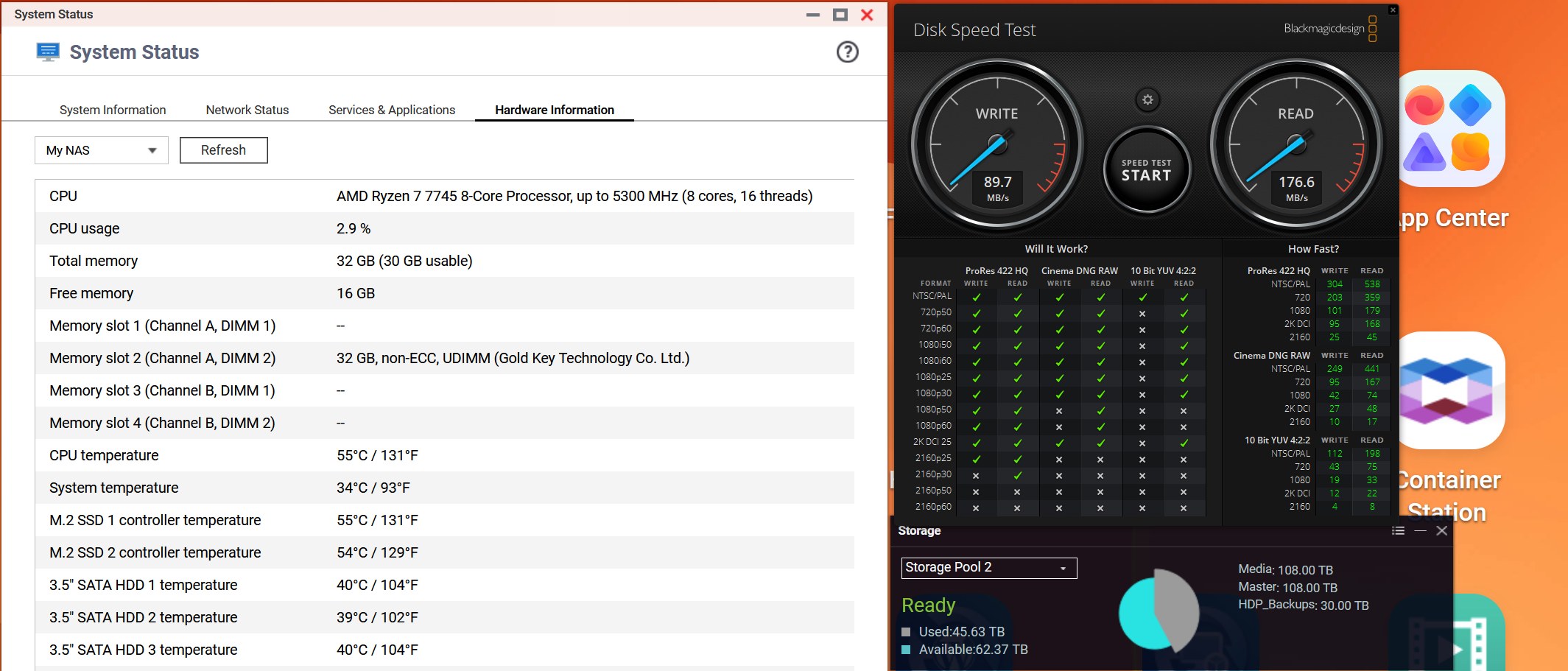
I use Black Magic Design Disk speed tool to see how fast i can pull data from NAS since i EDIT 4K videos from NAS in Davinci Resolve and to my surprise speed of QNAP (i have both 10Gbit LAN connections plugged into my 10Gbit switch and SMB multichannel is Auto/ON) is roughly 290MB Read and 450MB Write ?

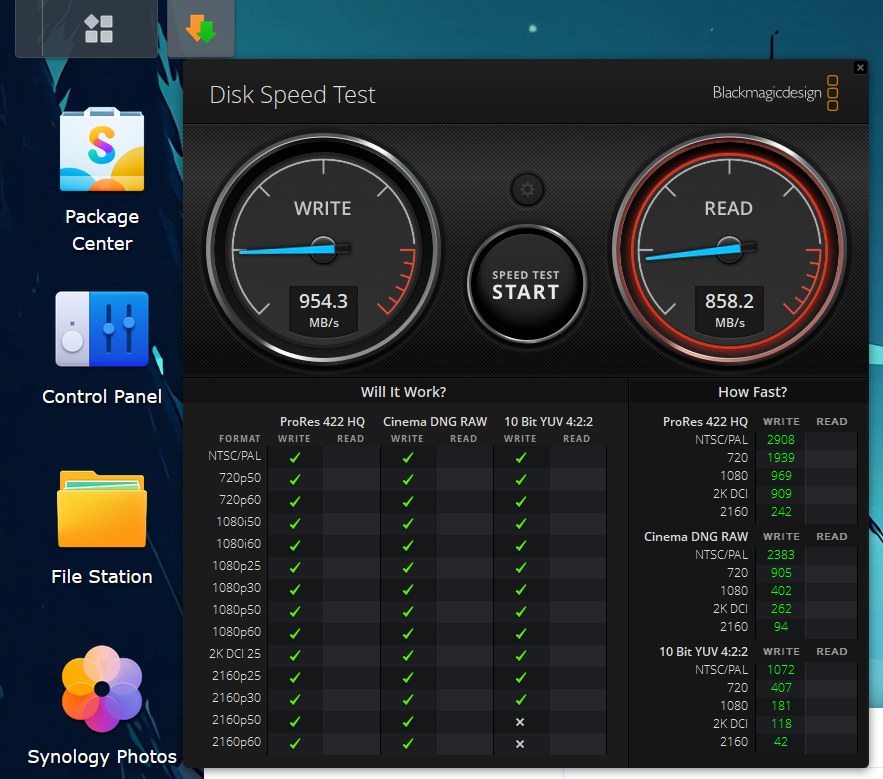
I did expect much higher speeds (since my Synology with 8 drives (4*18TB + 4*22TB in SHR-2 (Basically Synology Raid 6 with mixed drive sizes) gives me 850MB Read and 900MB Write over same PC/switch combo where QNAP is also connected to.

So i wonder how is QNAP that much slower with 8x times stronger CPU and more RAM + apparently much better File System (ZFS vs BTRFS) ?

What did i do wrong?
Maybe something is wrong in my setup but this is way way too slow speeds.

I’ve checked online and among all the “AI nonsense” what Google spits out nowadays something might even be true. It says that RAID 6 with odd number of drives (9) might be the problem here so i should either go to 8 drives or buy 10th drive to gain back speed?

Any truth in that ?

At some point it even says that i need to delete my volume and start from scratch with all disks inside due some “quirks” of how ZFS works but that has no sense to me 'coz then POOL expansion is basically useless if i can’t expand pool without rebuilding my Volume from scratch every time ? That surely has no sense - right ?

Please advise/help..

Thanks

adding disks to a zfs vdev is relatively new

did you do a speedtest before expanding ?

Sadly i did only last week when i was testing with 5x*8TB drives and i had results around 450/500 in RAID 6 which i assumed is OK-ish/normal due being only 3+2 setup (2 for parity). I was happy with 3 drives hitting 500mb and expected more when i add more disks. That was before my 18TBs arrived which i use now.

volume 1 - 2xNVMe 2TB drives for System/Apps - RAID 1
volume 2 - 9x18TB MG09 Toshiba’s for data/video/photo - RAID 6
volume 3 - 2x8TB for Surveillance only - RAID 1

So sadly i have no test for volume 2 prior expansion (when it was with 6 disks) but these speeds are very low :confused:

Now it’s even worse hitting 90/180.
My pool still have 60+TB free space.

Here is screen grab

Hello,

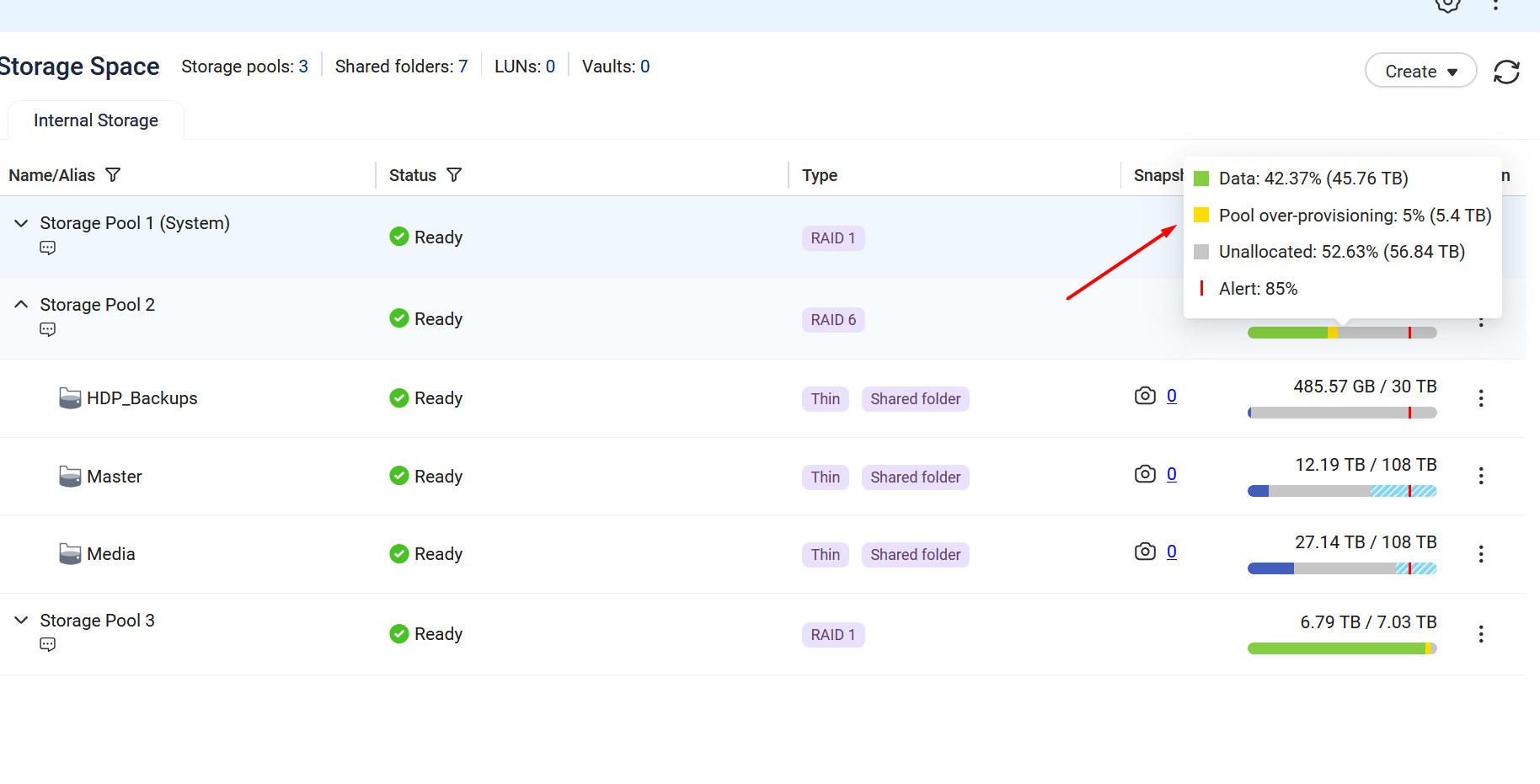
in a other Post you say “over-provisioning … not needed for HDDs.”
Have you change it ?
Storage pool over-provisioning | QuTS hero h6.0.x

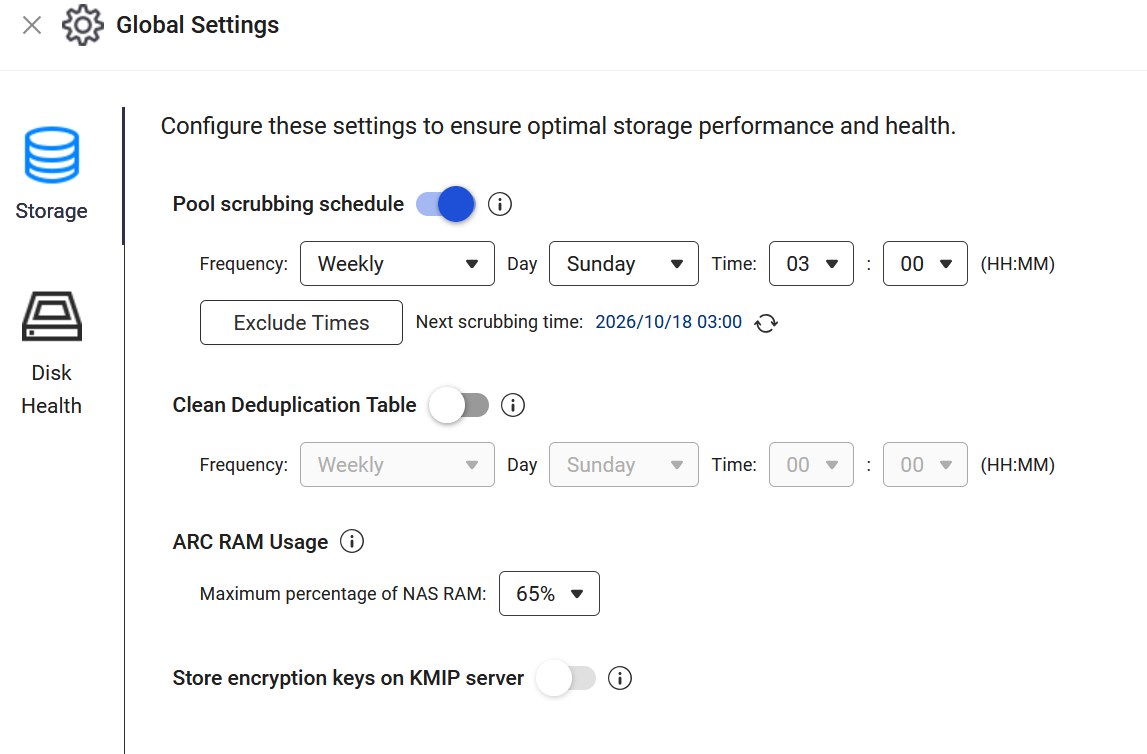
And how is your ARC-RAM setting ?
Storage global settings | QuTS hero h6.0.x

Hey @Becker2020 - that’s good ide i’ll see does bringing back “over-provisioning” help that. Although accordign to all info i’ve read that helps only/if space is filled up 90%+ whihch is not my case since i have more than 50% free space on my pool currently, but i’ll try.

As for ARC-RAM i havent thouched that, it’s set as is by default:

here is screen-grab of those

And BTW here is my Snyology speed result:

EDIT: I just tired Pool over-provisioning to 5% (more than 5TB of my pool space) and i see no difference in speed. It oscillates from 80-120MB/s Read and 150-170MB/s Write on multiple tests/tries.

Then your nas have another problem

We’ll run some performance tests internally on a similar setup to check the read/write speeds after expanding a ZFS pool, and I’ll follow up here once we have the results. Thanks!

I understand you expanded your pool, but is it possible that your RAID array is still building? That’s a lot of space that you have and that you added. You can get the pool working but the system is still building the array and setting everything into place in the background. I don’t think you can build a 108TB system and have the array fully built overnight.

Well my drives werent full when i did it so not sure how long it is supposed to take (ZFS aparently is better on that than some other filesystems) but i couldn’t expand pool untill it was done (cca 15-16h when I started it was counting percentage 0.01%, 0.2%, 0.5%, 1.05% etc untill it reached 100% day after…).
So expansion worked only when that counter finished and currently there is no indication that any rebuild is ongoing and CPU usage of 1-5% would surelly be too low if rebuild would be ongoing currently ?

I know ZFS expand option/feature is pretty new (i think it got added only last year ?) so i hope QNAP team can check internally (as Steve suggested) and possibly find some BUG that caused this and can be fixed with software update.

Right now I’m still waiting to finish copying 25TB+ additionl data (it’s going for more than 20 hours now) and since it’s superslow for 10Gbit Filestaiton estimates cca 1 more day until it finishes.

Then i’ll try to reboot NAS to see will that “refresh” it back to normal speed.

cheers

OK. AFAIK, the Raid Rebuild is different than pool creation. Raid Rebuild/Syncrhonization is a low level bit by bit synchronization of the data across the array. Going sector by sector on the physical drives takes a long time. But if your CPU usage is low then perhaps it finished more quickly…

Ok guys, here is the update:

After all is copied i rebooted NAS and now i can see speeds of Read 400-550 MB/s and Write of 450-600 MB/s. That’s on first run (writing 5 GB files). On 2nd run it falls downn to 300/500 or around that and keeps failling down slightly on each consecutive run :(.

I’ve “chatted” with AI and described the problem, went through many forum/reddit posts and all the options i could find. And as AI concluded it might be down to how QNAP implemented ZFS or it is missing (and Synology have) that maximum block size to be 1MB instead 128k maximum on Qnap to have better speed with big files.

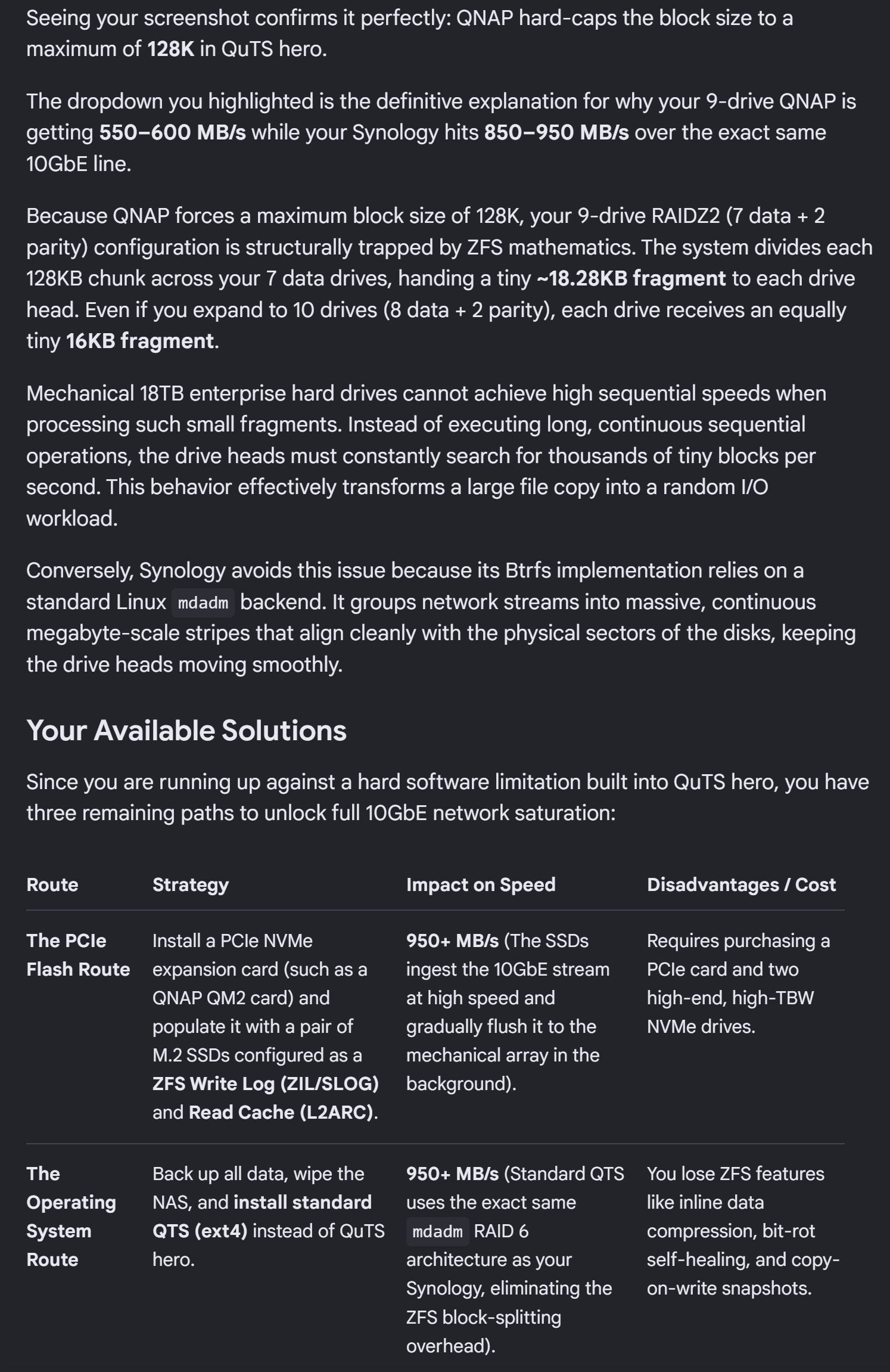
This is just screengrab (on bottom of post) of last summary what AI (Gemini) thinks it’s the problem. And since QNAP QuTS hero really don’t have that settings to go above 128k (that’s max) it really might be the reason why RAID 6 is so slow on QNAP :/.

Now i could scrap all volumes (and loose 5 days of copying files :/) and go to regular QTS EXT4 (instead QuTS hero ZFS) but that would make me loose Snapshots and few other stuff that EXT4 don’t have and QuTS hero/ZFS have and also Synology BRTFS, also it would limit me to 250TB max pool size (which is another one of reasons i wanted to go away from Synology (among biggest one/drive lockout) which limits it to 108TB on many NASes and 200TB with bigger ones whcih is easy to hit with todays HDD sizes…

So all in all it seems my transition to QNAP won’t be easy as i thought and I won’t be able to edit 4K 60fps files (seamless) of of my NAS :confused: :(.

Maybe QNAP Devs can implement bigger block size into QuTS hero 6.1 release?

cheers

Screengrab of AI contemplating of reasoning:

Just don’t rely on AI..it tells you bogus, QTS supports pools with snapshots

You might want to chat with @Bob , all he does is video editing machines, many of them on QNAP

True AI oftent is misleading but i often correct him (her?) and eventually it gets the corerect info properly with proper links to topics and not just “guessing” :slight_smile:.

As for QTS with EXT4 i’ve said it wrong, i should say EXT doesn’t offer Deduplication/Compression and Self Healing, sorry my mistake/bad.

But the thing is in general with my NAS at 24bays ZFS is always recommended to go with ZFS, even with QNAP itself (i looked many videos on QNAP UK, great resource for proper info :)).

I’m just badffled to understand that adding more drives will make my transfers even slower so i wonder then is 25Gbit add in cards QNAP offers (i thought i’ll need to go to that once i get past 14 disks) even usable (RAID 0 is never recomended at production :)) if my NAS can’t even saturate 10Gbit with 9 drives then i surelly will not need 25Gbit add in card :/…

Hi Lewis -

I am only aware of your post, because Dolby mentioned my name, and I got an email saying that someone mentioned my name on this forum. You should have said something like “video editing” in your post, and I would have seen your post, instead of ZFS Speed Problems.

Before we get any further - I see that you are in Croatia. If you can get me into Dino Jelusick’s band in Croatia, I will fly to Croatia, and fix this problem for you in person for free.

I fully can appreciate the incredibly high cost of SATA drives in 2026, but that is what we are all dealing with. You have a TS-h2477AXU-RP, which is a great product. IF you want high speed performance, and you don’t have at least 12 - 16 drives in this product, then you are never going to get the speeds that you want for professional video editing products like AVID Media Composer, Davinci Resolve, Adobe Premiere or even Apple FCP X. With 6 drives in a RAID 6 configuration, you will get CRAP performance.

This is how to build a TS-h2477AXU-RP. You buy two M.2 NVMe drives (Samsung 990 EVO 1TB drives) and put them on the logic board on the TS-h2477AXU-RP. This is going to become Storage Pool 1 for your ZFS (QuTS) based operating system, and system drive info. You make this RAID 1. Oh - you have data already on your 6 drives - well TOO BAD !!! Buy the 2 M.2 drives, change your OS to QuTS (ZFS) put that on your 2 M.2 drives at Stoarge Pool 1 RAID 1, and now you can get started.

Now you get at least TWELVE matching 7200 RPM SATA drives (the Toshiba enterprise drives you are using are fine) - and you now create a RAID 6 Storage Pool 2 group with these. Can’t afford the 12 drives - well, then you are NEVER going to have a working system that will perform 1000 - 1100 MB/sec for multiple users for your video editing applications. And of course, you should really have 16 or all 24 drives - all matching sizes, but a MINIMUM of 12 drives.

Now, you will see in AJA System Test, or Blackmagic Speed Test, the 1000 - 1100 MB/sec performacne that you are expecting, instead of the 500 - 600 MB/sec performance that you are seeing now. And of course, you need a good 10G switch, and 10G ethernet adatpers on your computers. Have a small 10G system? A QNAP QSW-M3216R-8S8T will work great for you. Just stop it with the horrible 8 port TP Link unmanaged switch. And make sure that jumbo frames is enabled on all of your 10G ports on the QNAP and your computers.

You want 25G speeds ? Well - you need a 25G card for your QNAP, you need a pro switch like the QNAP QSW-M5216, or QSW-M7230, and 25G adapters for your computers, like the Sonnet Twin 25G T5. Then instead of getting 1100 MB/sec, you will get 2200 MB/sec.

And what will you get with your QTS setup with 6 drives in RAID 6 in your TS-h2477AXU-RP -

nothing ! The performance you are getting right now. And you will remain unhappy. AI is causing the crazy pricing of all the disk drives - this is not changing any time soon.

Bob Zelin

Something ain’t right if you are getting only 290 MB Read and 450 MB Write. Especially the Read speed is way off.

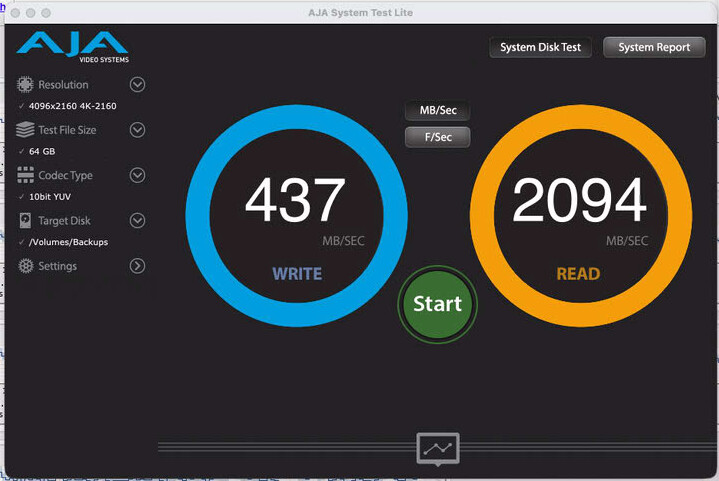
I have my lowly TVS-673XT (running an i7 tho) connected directly to my MacMini via Thunderbolt. Using the AJA Lite test app of a 4K video file I am getting write speeds of 437 MB/s and read speeds of 2094 MB/s.

So 437 MB/s = 3.5 Gbps and 2094 MB/s = 16.7 Gbps. I consider those numbers decent.

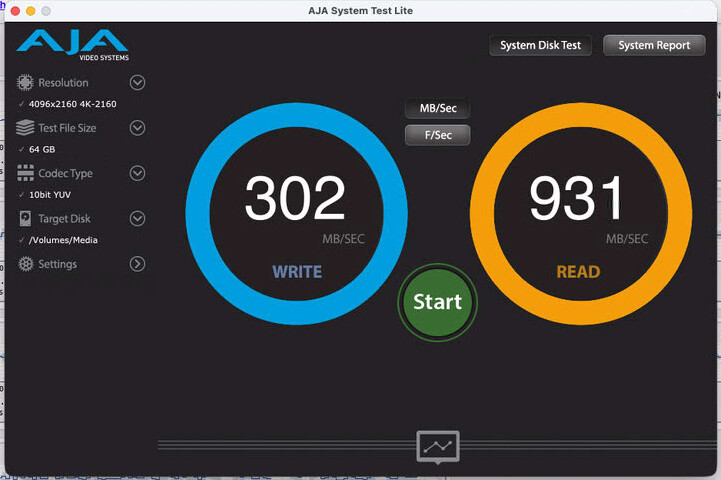
Testing to my TVS-873A which is going through the TVS-673XT’s virtual switch over a 10 Gbit network I get:

And while I am not getting anywhere near 10 Gbps speeds here, it still isn’t bad considering the TS-873A with the V1500B isn’t that powerful of a NAS and I am going through a second NAS to get the connection.

But even here with the 873A, I am still getting 3x the read speeds you are seeing.

Oh, and I am reading to/from hard disks not SSDs.

Hi @Bob ,

Thank you for your post, I appreciate you jumping in (i couldn’t know before how to lure you (or who to lure in general) in this post since I’m new to forums, new to QNAP but Dolby sorted that :)).

As for the Dino Band, i’ll see what i can do next time band is in my town :wink: :D.

As for Drives setup.

  1. Yes I already have 2*2TB NVMEs in my System poll 1 in RAID 1 (i got that from QNAP UK recommendations). I just used Kingston KC3000 instead Samsung but that’s not the issue here since those Kingstons are on compatibility list for ma NAS

  2. Pool 2 - Yes i started with 6 drives but then later i expanded with 3 more so now i have 9 drives total in RAID 6 and i still don’t see good performance/speeds :frowning:.
    I tried last night to add 10th drive (i pulled another one form my Synology system effectively putting my 2nd-ary NAS out of operation 'coz now I’m desperate to get this thing working but now it’ll take long time to expand that pool since i have much more Data on it than i had few days ago. (it’s counting progress slowly).

    1. As for switches i have UNIFI 24 Port Poe XG (10/25Gbit)
      and Unifi PRO Aggregation (for core switch 10/25 Gbit) so 10Gbit (or 25Gbit) speed shouldn’t be an issue here which I can confirm with my Synology NASes which can perform fine at 10Gbit on same network).

And you say minimum 12 drives to get saturated 10Gbit link is kinda confusing to me (not that i don’t trust you, you obviously have more experience with QNAP than me).
Why so many needed if single drive is capable 260MB+ why is ZFS on QNAP so problematic to get those speeds with lower number of drives :/? Is it possible that it’s because of that 128k vs 1MB block size which is capping it in QNAP QuTS hero?

Soon I’ll have 10 drives in RAID 6 (once extending pool/rebuild finishes) and that should be plenty of speed if this is working correctly.
BTW can i stop pool rebuild if i want somehow (if this won’t help the speed then i’ll scrap it, delete pool completely and start again with 10 drives?

One thing that worries me when i read more and more how ZFS works it that i might not get that speed even with 16+ drives IF i had data already written on drives i.e. like Adding drives and Expanding pool will not help IF i don’t create pool form scratch since ZFS will not reallocate already written data etc. etc…?

Is that correct ?
That would be very very limiting then on QNAP/ZFS side and effectively “force” user have fully populated NAS at beginning 'coz all other options are just too limiting, bringing NAS to crawl speeds or complete Poll delete/rebuilds every time when he wants to extend pool or expand Volume.

Thanks

@NA9D - I find it weird that your NAS have 16.7Gbit read speeds over 10Gbit Switch ? so it’s outperforming switch capacity by 60% ? How’s that possible ? Must be some glitch or cached readings (SSD caching ?) from that AJA test - right ? Can you please try with Black Magic Disk Speed test ?
Also are you using ZFS or EXT4 on that test system?

Thank you.

Regarding the speed issue, after discussing it with our R&D team, we’d recommend opening a support ticket so we can help investigate and confirm it further. Thanks!

Hi Steve,

Curently i’ve deleted pool completely (there it goes in to the wind my 5 days of copying data from Syno—>QNAP :)) and starting from scratch with 10 x 18TB drives (I still want to use RAID 6). If that still can’t saturate 10Gbit link then i’ll make Support ticket so we can see what might be done.

Thanks

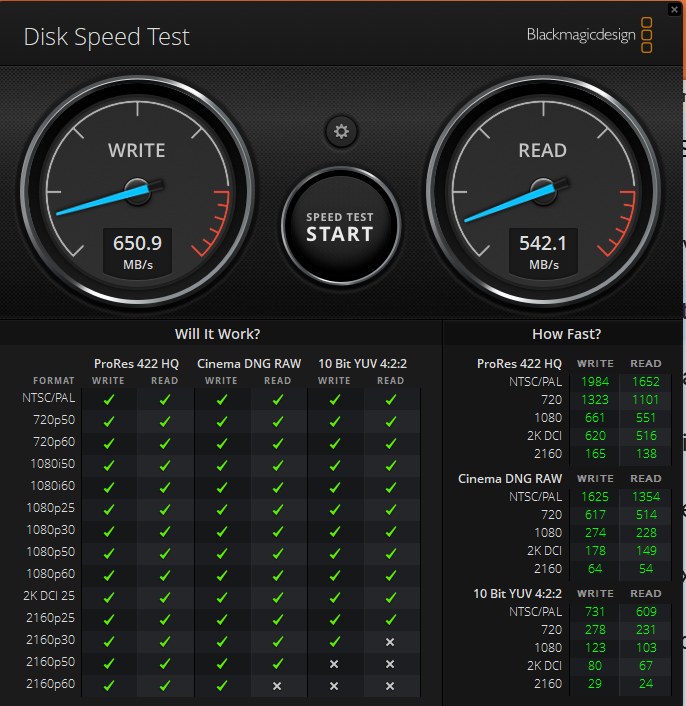
Ok here is what i get on newly created pool of 10 x 18TB Toshibas (7200 Enteprise drives) in RAID 6 and EMPTY disks (120+ TB free).
It’s better than before, but still nowhere what it should be and I kinda doubt adding 2 more drives would give me boost to 1100/1000 MB/s since this is 650/550 MAX (it oscillates from 400/480 up to 650/550 between runs..

So yes i’ll open support ticket in hope team can contact me and possibly check what makes it so slow :/.

You missed what I said. :smiley:

The TVS-672XT is connected directly to my Mac via Thunderbolt. It doesn’t go through a 10 Gbit switch. I believe the TVS-672XT’s Thunderbolt card is Thunderbolt 3 card (that’s when USB-C connectors were introduced) and Thunderbolt 3 is capable of up to 40 Gbps. So getting 16 is well within spec.

And if you see my signature you will see that both of my “big” NAS units are running QuTS Hero which is ZFS. Now I am not running Hero version 6 yet. Still on 5.9.