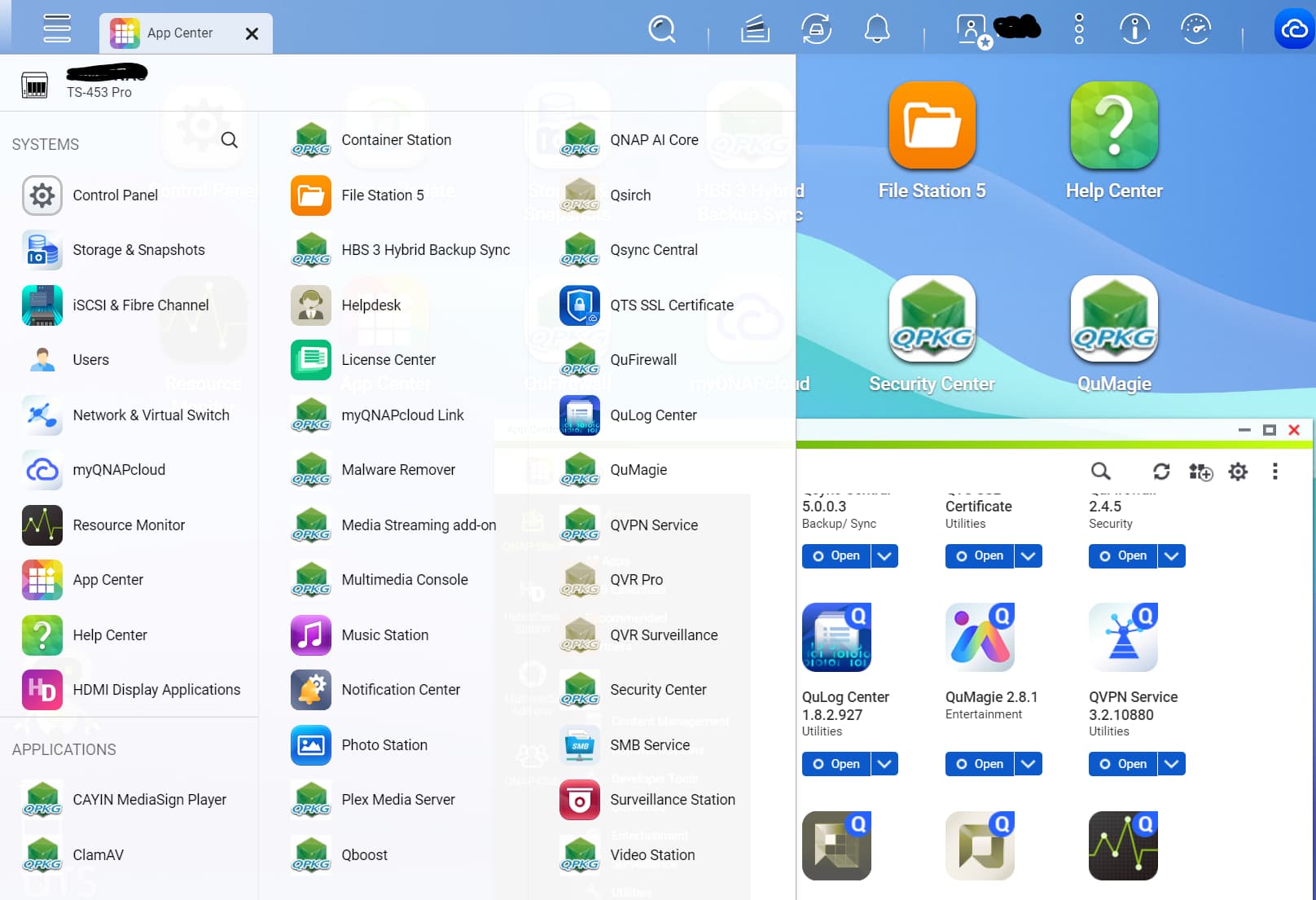
So I just upgraded to QTS 5.2.8.3332 build 20251128 (nothing unusual during the upgrade – restarted NAS beforehand, etc.), but after the final reboot and logging back into the Web Management GUI, some of my QNAP Desktop Shortcuts no longer display their App icon, and instead show the generic green icon with “QPKG” written on it.
Some are fine (e.g. File Station, App Centre, QuMagie), but some that now have the generic icon include QuFirewall, Security Centre, etc.
Expanding the “Main Menu” in the top-left of the GUI (where Desktop shortcuts are “created” from) shows the same mix of correct icons and generic icons per App. Interestingly, everything under the “Systems” part of the menu is fine – but under the “Applications” part of the menu, it’s about 10 proper icons, 20 generic icons…
I’ve rebooted several times; I’ve logged in using a different account; I’ve downloaded QPKG packages and manually (re-)installed a couple of the Apps; but so far, no luck.
If I open “App Centre” itself, all of the displayed apps (whether “mine” or “all”) have their correct icon (I realize those icon graphics are probably displayed from a different source graphic).
All of the Apps with the generic icon that I’ve tested launch fine (and show the proper config – like my custom config in QuFirewall), and the system generally seems to be working fine. Having tried to research the issue, the only thing I hadn’t tried was a File System check, so I started that, it just finished, but still these generic icons are being displayed for random apps…
I assume it’s just something like an (icon) cache that’s been cleared or corrupted, and they just need to be re-generated somehow – I would have thought an app re-install would do that, but apparently not. (I haven’t tried completely uninstalling and reinstalling an app, just in case that loses app configuration – while hoping for another solution).
NAS Model: TS-453 Pro
Firmware: QTS 5.2.8.3332 build 20251128
4 x 4TB WD Red Drives (WD40EFRX-68WT0N0) in RAID 10
Any suggestions welcome…..