Shared folders gone after volume conversion - thick -> thin -> thick

So I might have done a very stupid thing.

I have a TS-673 and I’ve always just been rocking one big main volume for data and one for logs. I’ve never had snapshots enabled before and today I decided I wanted to enable it.

The only problem, was that I had no space left to dedicate to snapshots, so I would have to downsize it a bit first.

This is probably where I took the first bad decision. In order to downsize I converted it from a thick volume to a thin one and reclaimed some space. This action was rather quick and nothing seemed to be of issue. Then I set aside 5% as guaranteed snapshot space and took a snapshot. Everything seemed to work.

Now, I was a bit scared of continueing on a thin volume forever again, since I seem to have read that there’s a chance of data corruption, if you write more data than you physically have. So I wanted to convert it back to a thick volume, now with a proper smaller size, size the guaranteed snapshot space would now limit the size. This might have been the second bad decision I made.

Anyway I started the conversion and I seemingly took forever, maybe more that seven hours and it was stuck on 52.7% for a very long time for some reason.

Now, after it was done I wanted to look around in the file manager and that’s when my heart sank. All my shared folders show up as they were before, but if I click any of them I get an error saying:

System Message

The file of folder does not exist.

Weirdly enough the only one that works is homes, but there’s no files in it, as if it was created new. Looking in the shared folder settings they are all still there however.

When looking in the usual place, all the shared folders are missing as well though:

[~] # ls -la /share/Multimedia
lrwxrwxrwx 1 admin administrators 28 2025-11-22 10:22 /share/Multimedia -> CE_CACHEDEV1_DATA/Multimedia
[~] # ls -la /share/CE_CACHEDEV1_DATA/
total 0
drwxrwxrwx  6 admin administrators  120 2026-01-04 16:34 ./
drwxrwxrwt 32 admin administrators 1000 2026-01-04 17:29 ../
drwxrwxrwx  7 admin administrators  160 2026-01-04 17:05 homes/
drwxr-xr-x  2 admin administrators   40 2026-01-04 16:34 .snapshot/
drwx------  3 admin administrators   60 2026-01-04 08:52 .system/
drwxr-xr-x  3 admin administrators   60 2026-01-04 15:22 .wfm/

However, when looking at the space usage on the volume, I still see the correct number TBs used. 17TB out of 20TB.

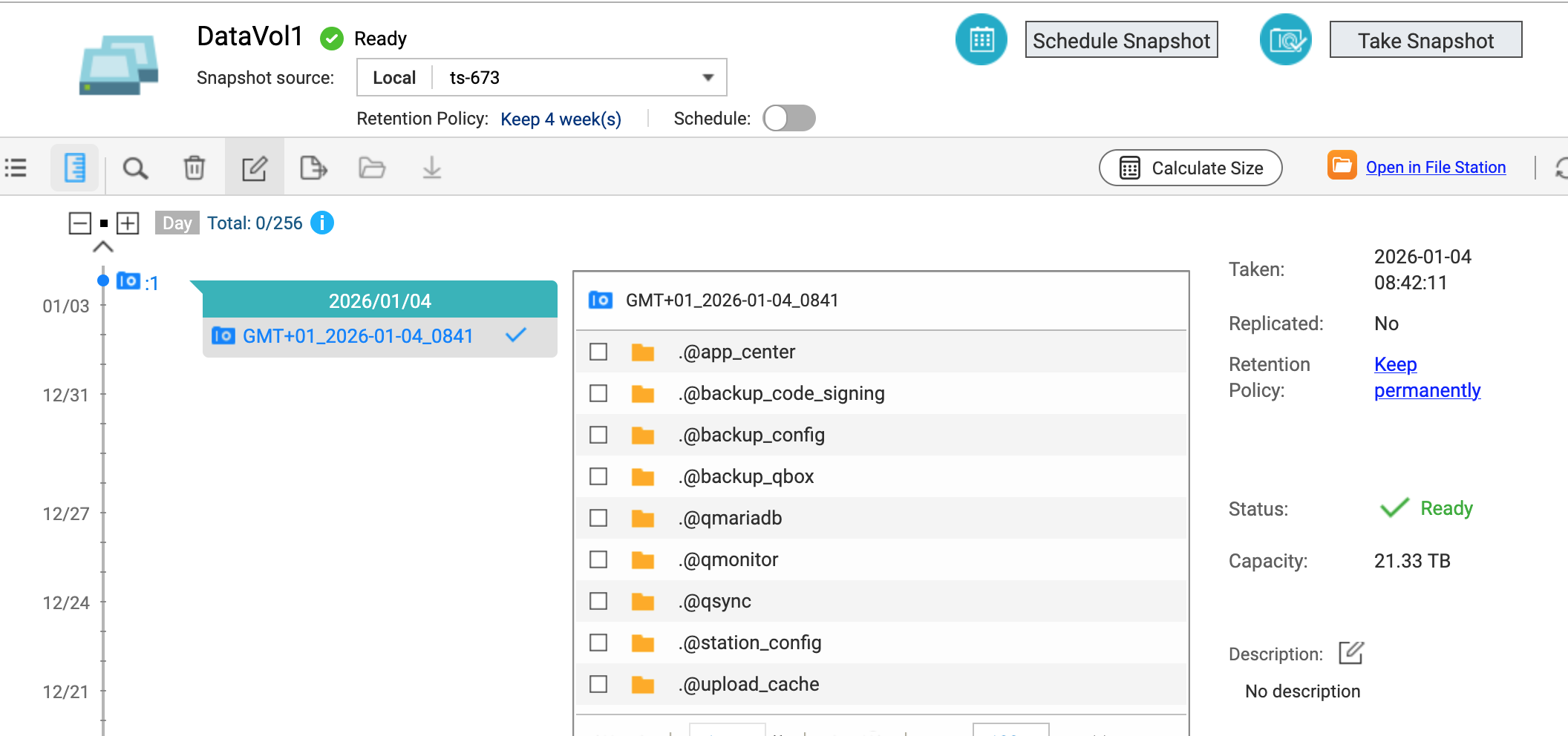
From there I looked at the snapshot I had created from the thin volume and that one still looks like it has all the files. I can browse and find everything it seems, if click the “Open in file station” link, but I can restore anything, because I don’t have enough disk space left it says.

I can confirm it directly on the system too:

```
[~] # ls -la /mnt/snapshot/1/10001/Multimedia/
total 124
drwxrwxrwx 16 admin administrators 4096 2026-01-04 08:23 ./
drwxrwxrwx 57 admin administrators 4096 2026-01-04 08:12 ../
drwxrwx— 2 admin administrators 4096 2025-11-29 21:31 .AppleDB/
drwxrwx— 8 500 everyone 4096 2024-12-31 12:05 Audio/
drwxrwx— 3 admin administrators 4096 2025-09-05 17:29 Downloads/
drwxrwx— 7 admin administrators 4096 2025-09-05 17:42 Dump/
drwxrwx— 2 httpdusr administrators 4096 2013-06-18 22:17 .hccache/
drwxrwx— 2 admin administrators 4096 2018-11-01 18:32 Network Trash Folder/
drwxrwx— 16 admin administrators 4096 2024-07-23 22:26 Pictures/
drwxrwx— 2 admin administrators 4096 2015-10-18 18:25 .__qini/
drwxrwx— 2 admin administrators 4096 2025-09-28 18:48 Recycle/
drwxrws–T 3 500 everyone 4096 2018-03-26 14:41 .TemporaryItems/
drwxrwx— 2 admin administrators 4096 2018-11-01 18:32 Temporary Items/
drwxrwx— 5 httpdusr everyone 4096 2021-09-17 21:41 .__thumb/
drwxrwx— 2 admin administrators 4096 2025-01-21 17:42 .upload_cache/
drwxrwx— 8 500 everyone 4096 2025-11-07 17:25 Video/
```

I’ve only tried the restore option so far and not the revert, because I’m afraid to touch anything at this point and also because the “Revert volume snapshot” sounds like you do something to the snapshot itself and that would be bad. It also asks for an encryption password, that I’m pretty sure I didn’t give when creating the snapshot.

I’m afraid to reboot it as well, because I’m unsure if I’ll regain access to the snapshot contents and that would be game over.

Right now I’m in the process of restoring some of that snapshot onto an external drive, but I simply don’t have the storage space at hand to move everything, so I’m looking for any advice that could help me, get things back in order.

NB. I’ve had to remove “@” signs in file paths above, because community thinks I’m mentioning people and there’s a cap on that apparently. :roll_eyes:

Here’s a bit more information about how the pools look like now:

[~] # vgs
  VG    #PV #LV #SN Attr   VSize   VFree
  vg1     1   6   0 wz--n-  21.80t     0
  vg256   1   2   0 wz--n- 912.54g 88.84g
[~] # lvs -a
  LV                      VG    Attr       LSize   Pool Origin                  Data%  Meta%  Move Log Cpy%Sync Convert
  lv1                     vg1   Vwi-aot---  20.40t tp1                          100.00
  lv1312                  vg1   -wi-ao----   2.23g
  lv2                     vg1   Vwi-aot---  17.75g tp1                          1.60
  lv544                   vg1   -wi------- 144.00g
  snap10001               vg1   Vwi-aot---  21.50t tp1  lv1                     80.52
  tp1                     vg1   twi-aot---  21.59t                              99.10  2.91
  [tp1_tierdata_0]        vg1   vwi-aov---   4.00m
  [tp1_tierdata_1]        vg1   vwi-aov---   4.00m
  [tp1_tierdata_2]        vg1   Cwi-aoC---  21.59t      [tp1_tierdata_2_fcorig] 99.98                  0.00
  [tp1_tierdata_2_fcorig] vg1   owi-aoC---  21.59t
  [tp1_tmeta]             vg1   ewi-ao----  64.00g
  lv256                   vg256 Cwi-aoC--- 799.57g                              99.98  0.46
  [lv256_cdata]           vg256 Cwi-ao---- 799.57g
  [lv256_cmeta]           vg256 ewi-ao----  15.00g
  lv545                   vg256 -wi-------   9.12g

So first of all, IMO, thin volumes are the way to go. Allows things to be much more flexible.

Yes, with a thin volume you can set the volume size to be greater than the physical disk space and of course that would create a problem if you exceed it. But careful management of your space avoids that quite easily.

I’m not sure why you had this issue, but it’s possible something got mucked in the resizing and shaping of the volumes. I also forget but I think there’s limitation on snapshots with thick volumes vs. thin. That’s really because snapshots can exist in your unused but “allocated” space on the thin volume and then get deleted when the space gets consumed. With a thick volume you don’t have that flexibility.

Anyhow, you have a snapshot - great! Revert is basically a restore of the snapshot. It’s confusing language.

Basically should be able to open your snapshot as a volume on your unit and copy data over. Before I do anything though I would clone your snapshot to an external drive. Then you have a backup of all of it.

1 Like

Hi, our internal team will look into this and perform an analysis. To help us better understand the situation, could you please provide more details about your current data usage?

  • Of the 21.8 TB total capacity, how much is currently in use?

  • What types of data are you primarily storing (e.g., large media files, numerous small documents, or backups)?

Thanks for your assistance!

That sounds good.

  • Currently usage sits at 17.03TB for the main, 21.33TB volume and 47.91MB for the secondary, 16.97GB volume.
  • There’s a mix of all of the types of files you mention actually. Lots of large media files and lots of smaller files as well. It also houses a time machine backup for multiple Macs.

Aha! I think I might see the problem here.

Your total space is 21.8TB. You have your space warning set for 80%. 80% of 21.8 is roughly 17.44.

I think you are hitting your space warning. Try decreasing that and you should have success.

That does not make sense. Do you mean the volume is 16.97 TB?

But you said you have a total capacity of 21.8TB.

So you have over-subscribed the thin volume storage space. You are approaching 80% usage on your first volume (21.33 TB) and are now trying to write additional data that will take the entire set of volumes over 80%.

You can try to decrease your volume warning size, but be careful as you begin to approach your full space when you have dual volumes competing for more space than physically exists…

Sorry I mistyped, it was supposed to say MB. There’s almost no log data there.

The main volume is pretty much at that 80% level yes, but does the alert setting actually have any bearing apart from … alerting you?

OK. So it is a thick and a thin volume. Plus you have a snapshot in there and we don’t have retention information on the snapshot.

I’m guessing that what is happening is that your snapshot is not letting the smaller volume expand. I bet the snapshot is taking up the rest of the unallocated space and settings are preventing it from being deleted.

The smaller thin volume is not supposed to really grow, it was only ever meant to be used for logs, which is why it has < 50MB in total.

I’m not sure what you mean about retention of the snapshot, but I’ve made sure to mark it for “Keep permanently”, since that’s now the only place my old files can be found. So yeah, I’m really counting on it to not be deleted, because that would be game over.

Without reading the entire thread, I hope you are not relying on snapshots as your backup plan. If files are importnat to you, you should back them up to an EXTERNAL location (removable drive, second NAS, cloud, etc)

Hello,

i think your pool is full.

https://www.qnap.com/en/how-to/faq/article/why-is-my-storage-pool-full-when-there-is-still-free-space-in-my-thick-volume

That the next problem

https://www.qnap.com/en/how-to/faq/article/what-does-it-mean-when-a-volume-status-is-readdelete-and-what-can-i-do

1 Like

Yes, but a thin volume by definition “grows.” You have a space allocation but that space does not become part of the volume until you need it.

And there you go! I don’t know how much data you have in your thick storage volume but as it grows, the snapshot will grow too. The snapshot sits in that unused, unallocated space so now as @Becker2020 points out, your pool is full. You have no unused space left.

And yeah, snapshots are great, but if your drives go bad, there goes your snapshot. At the very least, you should be backing up to somewhere else. Snapshots are good when you take them regularly so you can quickly go back to earlier versions of a file or directory (ie: I accidentally delete a directory and can quickly recover it from my snapshot).

But yeah - you filled up. If you want more flexibility, convert your thick volume back to a thin volume.

Hi, just an update that our team is currently attempting to reproduce the issue you reported.

In the meantime, could you please let us know the current status of your data? Are you still able to access and use your files, or is the system completely stuck and unusable at the moment?

Thanks for your help!

I have the most important data replicated offsite, but not everything. I only have less than 10TB available to me there, so it’s a matter prioritizing the right data.

I’m in the process of copying off the files from the snapshot onto a single big external drive. When I have that copy, I’ll feel more confident about playing around with the volume and such in QTS.

Interesting that the article you linked says the following:

Converting a thick volume to a thin volume releases free space in the thick volume back into the storage pool. However, once you convert a thick volume to a thin volume, you cannot convert it back to a thick volume.

So what I was able to do, fully through the QTS ui, should not be … possible?

I think my current plan is, once I’ve backed up all files in the snapshot, then I’ll try to revert to it directly. If that fails, then I’ll try to first convert back to a thin volume and see if that fixes the missing files and then ultimately, try to restore the snapshot on the thin volume. After that I figure the only option I have is to factory reset to get the system folders back etc. and then manually copy back my own data.

Regarding your point that “once you convert a thick volume to a thin volume, you cannot convert it back to a thick volume,” I would like to provide a technical clarification:

Based on my understanding, this statement primarily applies when there is insufficient free space in the Storage Pool. Since converting a thin volume back to a thick volume requires the system to pre-allocate the full capacity of the volume, the conversion is still possible as long as the Storage Pool has enough available space. However, if the pool is full, this operation cannot be performed.

2 Likes

Latest update is as follows.

I’ve rsync’ed most of the files off to external drives, as well as done an “export” of the snapshot I had.

With rsync I did have to ignore errors, because some files did result in errors like this:

2026/01/09 09:54:49 [6988] file has vanished: "/mnt/snapshot/1/10001.....

2026/01/09 09:54:50 [6988] rsync warning: some files vanished before they could be transferred (code 24) at main.c(2289) [sender=3.0.7]

It wasn’t all that many though, so I’m hoping those might just have been victim of some random bitrot.

The snapshot exported, seemingly without error.


The next thing I tried was to convert the volume back to thin, this failed and resulted in not being able to see the snapshot anymore from the UI.

It said the volume was in an abnormal state after that.

Still stuck on a thick volume, I attempted to revert the volume to the snapshot, and this was running for a good while before I went to work today. After I came back home to check however, it had failed, with the following error:

Error	2026-01-13	12:33:46	admin	192.168.1.5	Web Desktop	Mozilla/5.0 (Macintosh; Intel Mac OS X 10.15; rv:146.0) Gecko/20100101 Firefox/146.0	Storage & Snapshots	Snapshot Replica	[Storage & Snapshots] Failed to import snapshot "GMT+01_2026-01-04_0841". Path: /ExtRaid/ts-673_DataVol1_GMT+01_2026-01-04_0841.img.0000000, Volume/LUN: DataVol1.

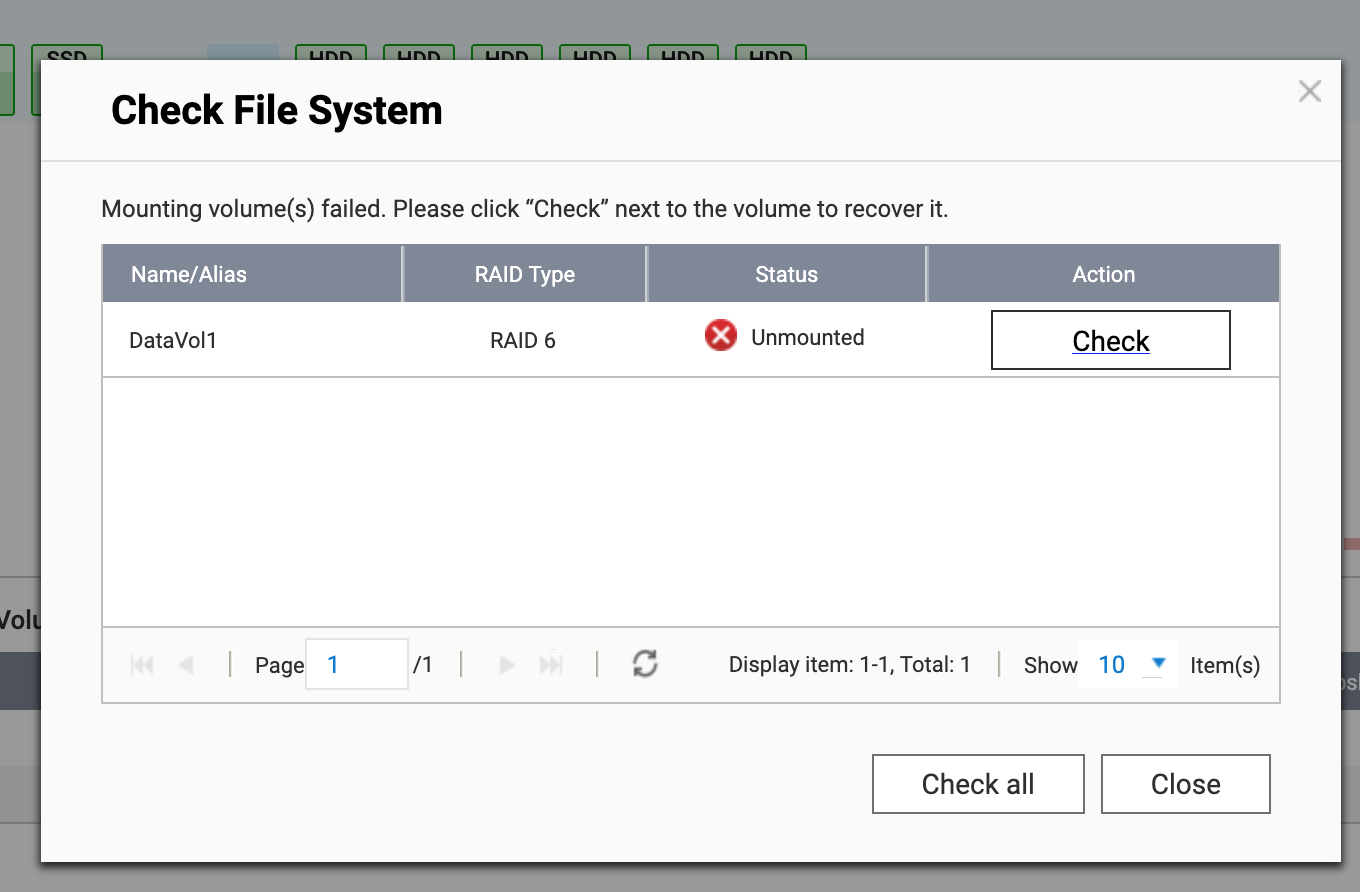
After that the volume was in an Error state. I decided to try and reboot finally and after the reboot the volume was in an Unmounted state.

I’ll try again with the snapshot, but if it won’t suceed, I think my only other next course of action, is to try to manually restore files from the rsync copy and hope they’re not corrupted.

Did you export your snapshot to an external drive?

What you need to do at this point, I think is wipe your drive and start over. Sorry to say that but that seems to be what is needed.

I did yes. And I decided that removing the volume would probably be the only way forward as well. So now I’m trying to build a new volume off of the snapshot, so far it’s still going without an error. I’m hoping that the failure to revert, does not mean that the snapshot can’t be used to create a new volume from scratch. Fingers crossed.

It should be fine.

Hopefully you set things up as a thin volume this time that can expand as needed. :smiley: