I’m trying to replace my Synology NAS (soon-ish) and switch to QNAP so now I’m in process of installing QNAP apps for that goal :).
One of great apps i use (and love) on Synology is Active Backup for Business (ABB) to back up 5 of my Workstations System drives (C:) with automatic schedules (for adding snapshots/new stuff every 2-10 days depending on workstation).
I’ve got info (in one of my previous threads) that QNAP has same/similar app and can do same which is great (and well needed since that’s my most important app to replace).
Since i’m still setting up my QNAP system I got “lost” in plethora of “Backup” apps on QNAP to that level that I’m not sure which one to install so i can do “bare bone” restore (boot form USB, point to NAS IP and restore complete system in case of windows crash/problems/malware/crypto virus etc. etc…
So I see in QuTS hero APP centre these:
HBS 3 Hybrid Backup Sync
HDP for Business
HDP for PC/VM (Hyper Data Protector)
HDP for SaaS (Boxafe)
NAKIVO Backup & Replication
I’d assume that No3 (HDP for PC/VM) is one that is most similar to Synology ABB, but what’s the deal with No2 (HDP for Business) ?
Is that one I should use now since it seems newer one than HDP for PC/VM ?
Funny. Typically I have the opposite view. I go to a company that specializes in storage for a NAS, I go to a router company for the hardware (and use 3rd party O/S if possible), I go to a software specialist for what runs on that hardware. I find, in general, that hardware vendors often provide a “marketing-level” software option, i.e. just enough to include it in the marketing materials, certainly for end user stuff. Sometimes, they do have decent software, but I’d say it is pretty rare to have a real feature rich offering that can match what a dedicated software company has to offer.
It is always nice to have options.
(Just because a hardware vendor offers software doesn’t mean they will develop or support it indefinitely. There are many examples of products that have been discontinued, and I’d argue it is even more likely if that is not their primary business i.e. revenue. )
Understood, but at first glance on that WEB i checked, and it seems its Buy for licence? ,or I misunderstood and on QNAP version is free?
I really don’t want to pay some licensing now, ABB on Synology is free (still ;)) and works easy and fast for my needs so i just want replacement for that, nothing fancy/more feature packed is needed for me currently :).
When it comes to reliability, Veeam is the best. I personally use Acronis for my PCs.
The QNAP solutions didn’t win me over. There were always some kind of glitches, and the backup would fail.
Your guess is right: the native equivalent of Synology Active Backup for Business is HDP for PC/VM (Hyper Data Protector). And since you mentioned wanting something free like ABB: HDP for PC/VM, the HDP PC Agent and HDP Recovery Media Creator are all free, with no limit on the number of PCs you protect per NAS.
The workflow for your 5 PCs:
Install HDP for PC/VM on the NAS and the HDP PC Agent on each Windows PC, then set up scheduled backups of the system drive with the retention you want.
Use HDP Recovery Media Creator to build bootable recovery media, either a USB drive (1 GB or larger) or an ISO. The first time you run it, it will guide you through installing the Windows ADK and Windows PE add-on it needs.
If a PC fails or gets hit by ransomware, boot it from that media, and the Recovery Wizard restores the whole system from the backup on your NAS.
HDP for Business is a different product: it’s built for enterprise IT teams centralizing backup across multiple sites, and it’s currently in public beta (Introducing HDP for Business (Public Beta)). For a handful of PCs, HDP for PC/VM is the right fit.
Veeam, which others suggested, is also a solid option. QNAP partners with Veeam and our NAS is Veeam Ready certified. Either way, your NAS will serve well as the backup target. If you’d rather stay native, HDP for PC/VM covers what you described.
One tip: once your first backup completes, create the recovery media and do a test restore on one machine, so you know the whole process works before you actually need it.
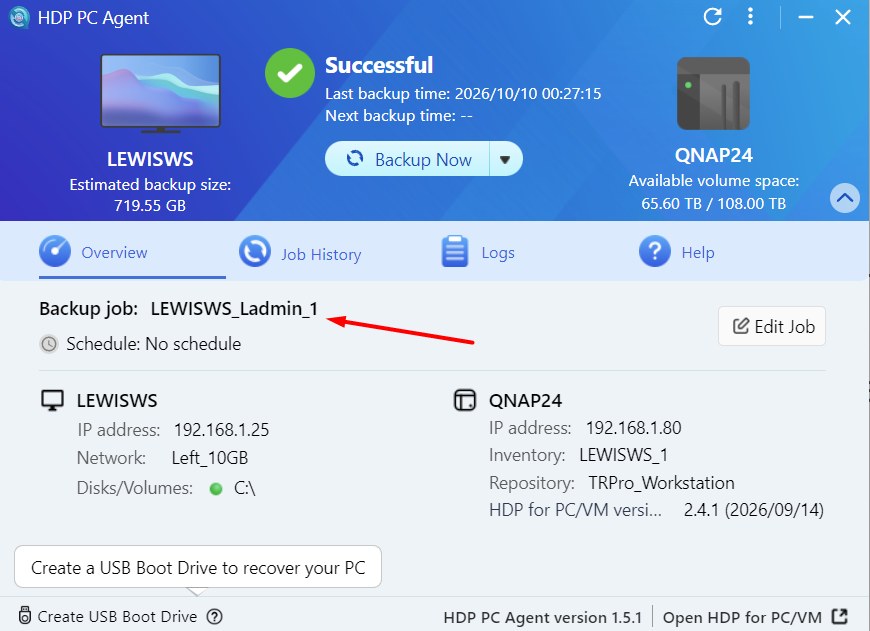
I’ve sucessfully made my first Backup (although it goes kinda slow 1h49m for my PC “C:” drve only which is also on 10Gbit network?) and steps you described are easy to follow and basically behaves same way as ABB for Synology so it was not a problem.
Can i somehow rename “Backup job”. I tried that “Edit Job” button but can’t seem to find way to rename it from that inherited/automatic name ?
After 10 days of usage i do have some more questions.
I’m using HDP PC Agent and all was backed up fine to my NAS folder for first manual backup, then I’ve set it to do automatic backups every 2 days of my Workstaiton C:/System drive only.
PC Drive is NVMe with about 730GB of data.
Network speed is 10Gbit from PC to switch/NAS so none of that should be bottleneck.
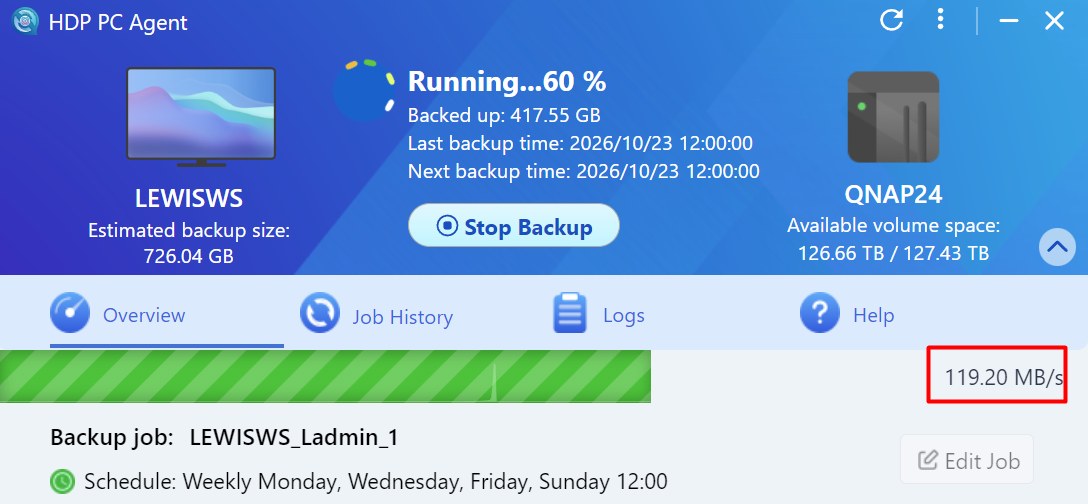
But for some reason i see speeds only 120MB/s from HDP (regular transfers to NAS are fine 800-900MB/s no problem but HDP seems like it’s limited to 1Gbit LAN instead 10Gbit ???)
Also why does HDP backups entire drive every time? Shouldn’t it just add changes/snapshoot of new data (like Synology ABB is doing so all reaccuring backups take 5-10 minutes (just changes adds 20-30-50GB of new files) instead 90+ minutes like on QNAP is doing now at 60% done after 58 minutes) ?
I’ve also turned on compression thinking that will make files smaller/faster to transfer but still to slow.
I’m backuping up several windows PCs and it seems all working fine on manual backups. Finally it’s not backing up whole PC now but just adds new parts on System drive (i had to delete jobs and make them from scratch to manage/force it to do that so all good there now.)
But now i have another problem.
ONE of my PCs is workstation that it’s set to automatic backup every 2nd day (automated) at 11AM and it all works fine IF PC is ON at that day. But sometime it happens that PC is at sleep or shut down at 11AM (not often but there is situations) and at that moment/day my HDP just throws notification/e-mail error to notify me it couldn’t execute backup since PC is “offline” and that is logical/normal.
But what i expected is that HDP will re-initiate backup once PC is on/established conneciton that same day at first sign of PC being booted up?
Sadly HDP just skips it untill next time when automated backup is bound to happen?
Can i somehow “force” it to backup at next best/available time so if PC was off at 11AM and it’s turned on at 11:50 then backup instantly when you see it online instead “miss” the backup for another 2 days when next one is scheduled ?
I know virtually nothing about HDP, but to me the way it is working with a missed schedule is correct. Otherwise the backup could end up being run at a time when you don’t want it to run. To me, any scheduled process of any type that is missed should only run at the next scheduled time,
Yes i agree with you and that’s why i ask is there way/scheduler settings i could set to still run it as soon as PC is back online, Synology ABB (Active Backup for Business) always runs it at first possible time if set time was missed so i wasn’t worrying i’ll not have recent backup and i got used to that “workflow”.
Now i need to worry a bit :).
I’m not saying something is wrong with this HDP system i’m just searching can i adapt it more to my situation/habits :).