Do quirks mean you can’t expand pools or there’s just extra stuff you have to do? Just trying to weigh all my options here.
I have heard that expansion of RAIDz2 (RAID6) always needs pairs of two to expand, even though the manual does not say anything about it
https://docs.qnap.com/operating-system/quts-hero/5.1.x/en-us/expanding-a-storage-pool-by-adding-disks-to-a-raid-group-1D229DFC.html
I have never tried it myself, as I always had the full amount of disks available, when I build QuTS system pools (HDD or flash)
Lots of Crucial ram is now counterfit. Ionly buy Kingsston server ram for my ecc nas;s (Kingston Server Memory: DDR4 3200MT/s ECC Unbuffered DIMM - Kingston Technology) (TVS-h1688x, TVS-h1288x, TS-h886). and for the ones that use laptop ram (TVS-h674, TVS-472XT, TVS-673N) I only use PNY 3200 (rated for 2666 also) for my old TVS-882 I have 7 year old Crucial from before all the counterfeit stuff hit the market. I have seen counterfeit ram cause many various random issues. For one example 3 years ago I bought Crucial on Newegg for the TVS-472XT and when running 8 camera on Hybred desk it would get really clow and start dropping frames; sent the Crucial back bought PNY and never had another issue. In the past, beor I standardized I had similar problems to yours and replaced the ram and the problem went away. also, see this years long thread of another symptom of bad ram: UPS detected, but after a few days no more.. - QNAP NAS Community Forum (Shutting Down Soon)
Sorry for the typo’s I am 70 with Parkinsn;'s so my typing sucks.
1 Like
Dude - prop’s to you. My dad had Parkinson’s for about 18 years before he passed. Horrible disease. Bless you!
And thank you for the info on the memory.
Thanks NA9D, By the way I have 16gb of real QNAP server (ECC) ram out of my TVS-h1288x (went with 64gb of Kingston) if someone wants to buy it. rated 3200. PM me.
It`s a Linux-VM “librenms”
I found it in the german QNAP-forum
It`s from a german forum
1 Like
And QNAP have the app q`center
How to use Q’center to Centrally Manage and Monitor Multiple QNAP NAS Units? | QNAP
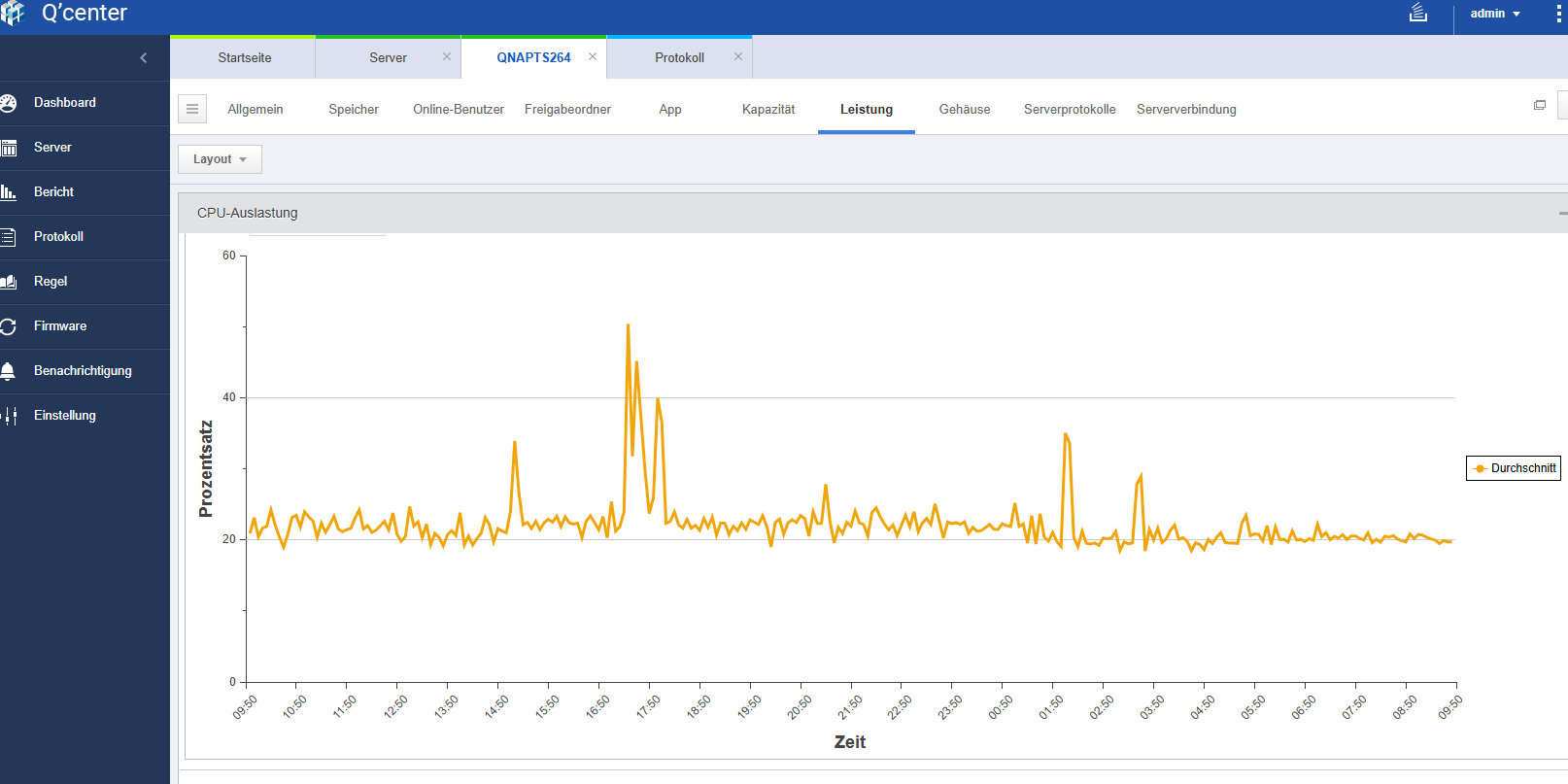
This looks great. I speak about two words of German but thanks to the translation features in modern web browsers I was able to make enough sense of everything in the forums!
Now, is there a public download link yet for Rednag’s VM? I would rather not have to make an account on a forum I will never use just to send him a PM to get the link!
And are you running this in a VM or in a Docker Container?
It`s a VM.
There is no public download link for the VM.
You can use the QNAP app “q`center”
Thanks. I’ll create an account and PM him.
It is now in a Docker Container in the Docker Repository.
1 Like
Well, I have wiped my NAS and installed QuTS Hero. Here’s the changes I have made:
- Added additional M.2 SSD drive so now I have two in RAID 1 configuration. OS and Apps going here
- Created two additional storage pools like I had before - Four 10TB drives in RAID 5 and four additional drives in RAID 0 (yes, it’s OK - non-critical data is in here).
Now in doing this I’ve run into a couple dilemmas:
1.) I can’t restore any of my system settings as those have to be of the same OS and I am running a different OS
2.) With the fist storage pool being on the SSD drives, the “Public” and “Multimedia” folders are installed there - any way to move that location?
3.) With the fact that my system settings can’t be restored, I’ve now lost all my backup jobs. I can restore from the destination in Hybrid Backup Sync, but as I understand it or can see, HBS only backs up the necessary files needed each backup. So you have on that is called “latest” and then you have additional folders for every other backup. Do I have to go searching through all these folders to recover my data 100%? I don’t want to just restore the “latest” folder and miss stuff buried somewhere in a folder from 3 months ago.
Things do seem to be operating more smoothly than before.
The OS is on all drives…not just on the SSDs
- Correct, those are not compatible
- No need to ise those, just ignore them
- Did you do a containerized dedupe backup ? Please explain what kind of backup was done
Actually, from what I have read in multiple places, for QuTS Hero, the OS is stored on only the first storage pool. I’ve read this both on various forums and other places documenting this. For the standard QTS OS, it is spread across the drives.
QNAP QuTS hero - ZFS-based operating system | QNAPWorks.com)
My backups were all done by Hybrid Backup-Sync. Since the original backup-job no longer exists on the QuTS Hero server, I just had to recover from the location. I discovered that “latest” contains everything. Trying to recover all the different backups results in a massively large set of files being recovered as it looks like in the backup process every file is saved just once but each folder has a pointer to the files it needs. So when you recover everything you recover multiple copies of the same file.
No idea where you read this…but no matter if QTS or QuTS md9 and md13 are spread across all internal drives
I have seen it in the link that I provided as well as multiple forum posts and elsewhere. I was looking for something specific on QNAP’s website or documentation but haven’t found it yet.
There is plenty of links in this topic (no idea what link this ks referring to)…also QNAP does not give any in depth detail on how the OS is structured in any public documentation.
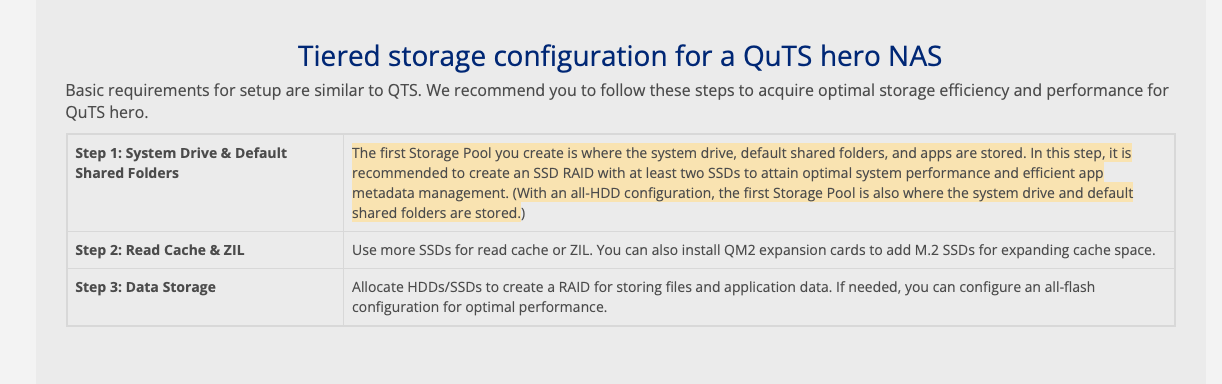
Here’s some more info. This post on Reddit says it’s copied across all the drives, but the first pool is a “system” pool where all your compression and de-duplication is done:
https://www.reddit.com/r/qnap/comments/115099k/a_correction_and_more_detailed_explanation_of_why/