System drive contains the default shared folders and apps, says nothing about the OS
The dedupe default drives is also correct (so also a reason to switch on wear levelling, over provisioning and only on redundant drives as dedupe KILLS your TBW)
System drive contains the default shared folders and apps, says nothing about the OS
The dedupe default drives is also correct (so also a reason to switch on wear levelling, over provisioning and only on redundant drives as dedupe KILLS your TBW)
Ah. OK.
Now, I am seeing a very strange problem today. The system is at a crawl right now - possibly because I have a number of media files (videos, pics, etc) where I am having thumbnails generated, etc.
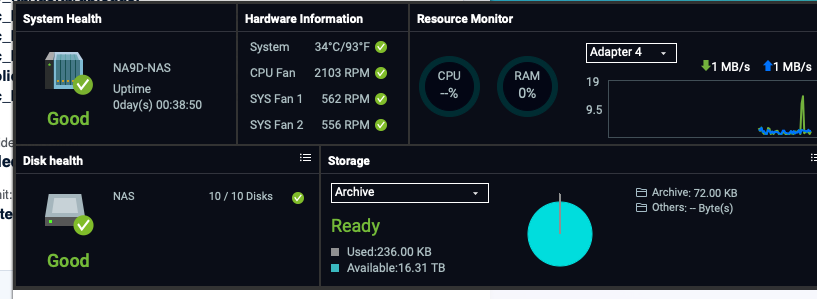
I got an error this morning that I had zero RAM in the NAS. Could that be due to bad memory? I ended up shutting the system down and put in different memory. But I’m still seeing this. I’m wondering if things are all slow due to all the background processing…
I have never seen zero RAM, no idea (did you use 3rd party RAM ?)
Also I would not use any of these QNAP apps, they are slow and bad. Use other apps (Plex for media for instance)
Yes, I have third party RAM. To use QNAP’s RAM, it costs as much as the NAS itself! But right now I think it’s because it’s not getting updated in time when you open the dashboard. The system is busying going through all my photos database building thumbnails, etc. I also have de-duplication turned on for the photos folder as I know I have a lot of duplicate photos (am I understanding deduplication correctly?). So I think the system is just very busy right now…
Lol my OG Nasbook takes forever to open any app. Maxed out ram. I always thought QTS was supposed to be this slow. I’ve always chalked it up to the internal NAND being slow.
So quick update. The “zero RAM” thing seemed to be more of a Web UI display issue rather than a RAM issue (or so it seems). After letting the NAS sit overnight and finish all of its thumbnail generation, facial recognition, etc, it is actually behaving quite snappy this morning.
I have seemed to notice throughout my time of now having two QNAP NAS units, that whenever it is doing a lot of disc intensive activity (raid rebuild, image processing, etc), the responsiveness of the unit slows to a miserable crawl. CPU time doesn’t even have to be that high (it was running 50 to 75% all day yesterday doing the background processes). I’m not sure if it’s just the fact that you have to wait on the mechanical features of the disk drives (ie: has to physically move the read heads from one part of the disk to another and when you have multiple read/write requests the millisecond delays add up) or if the i/o bus of the NAS is getting filled up or what. I’m guessing it’s just disk access limitations with so much going on.
Anyhow, I have some other memory arriving today that I will try out. And when I get back from vacation and get my GPU back from a friend, I plan on running a memory test that QNAP asked me to do. I have a feeling that my memory is fine. Now my GPU might not be but that’s a different story and my own dang fault!
But here’s an interesting statistic…
Right now I am copying about 600 GB of data from the flash “system” drive to the hard disk array. The data transfer rate is showing roughly 40MB/sec. That is 320 Mb/sec. That seems awfully slow for a flash transfer to a RAID 5 SATA array. SATA should be able to transfer up to 6 Gb/sec. And the PCIe 4 flash drive should be at least 4 Gb/sec. So why the NAS is only transferring at a fraction of that rate is a mystery to me. That does seem slow…
Have you done a full reset yet? The slow NAS and slow transfer is not normal (we had already established that)
If I have updated to QuTS of course I have.
Edit: It’s possible the slow speeds I’m seeing right now are just due to the types of files being transferred - small files, photographs, etc. I know transferring a lot of small files can actually be much slower than transferring large ones just because of the start/stop nature of the transfer process. That’s why sometimes it’s more efficient to ZIP things before transferring…
Well, some kind of major problem has happened with my box. Seemed like everything was running fine. I was setting up QSync this morning with one of my computers. I had to reset all the sync locations. As soon as I did it, the box went off to never-never land. I could not connect to it. I couldn’t even SSH into it. It would take my password and then hang. I have since then had to manually shut it down multiple times. Each time it comes up OK and then goes haywire. I can’t even ping the NIC now. I don’t know what is going on.
Did you ever change to 3rd party RAM ? If so, switch back to the original and test again.
If it’s still wonky, leave the original RAM in and open a ticket with QNAP
Been using 3rd party RAM. It was working fine. I think something got corrupted in my network settings. I managed to reset them via the reset switch. I did go back to the original 32 GB memory I had purchased which is Crucial. I’m heading out for a cruise but when I get back next week, I’ll be working with QNAP. They have already asked for me to run a memory test, but I need to get my GPU back from my friend who is checking it out. So once I get that back, I’ll run the memory test on all the memory I have purchased and see what’s going on.
The memory that came with the unit wasn’t QNAP memory but from Kingston. New Egg has that memory in larger sizes. So maybe that’s an option if needed.
So I’m back from my vacation and I have installed a working GPU card into my TS-873A. I have run a memory test (per QNAP instructions) on my 64 GB of 3rd party memory and it all tested out fine. So any issues I have related to speed are not related to memory errors. So we can clear that out.
I think things are finally settling down on my unit. It seems like if there’s a lot of background activity going on that requires disk access, it just drags to a crawl.
I had a TeamViewer session the other day with QNAP support to try to figure out the issues I have had with importing my previously backed up Docker Containers and one of the techs that was on said that it’s not unsual for the unit to get slow if you have a lot of activity going on. So I guess it’s just life!
Right now though things seem to be performing better and my CPU levels are somewhat reasonable. I guess if I want “faster” response time, I would need a unit with more CPU horsepower than the TS-873A.
Qsearch uses a lot of cpu when it first indexes.On aTVS-h1288x with a Xeon CPU it can use around 30% for over a day if you have a lot of files. If you are using Qsearch and something caused it to have to start over this could be the cause. If so, it will settle dowm.
So we already talked about my potato 8gigs.
Your system install is F’ed.
Nice of you to attempt a comment months after this issue was resolved.
Yeah I don’t know how this got in my Latest list. My bad.
One note: while cache drives are near worthless on QTS.
QuTS is completely different. “Cache Acceleration”/L2ARC is a completely different beast and is a recommended way to run ZFS.
If you still find random writes lagging the whole box and you have spare CPU look into L2ARC/SLOG.
Well on my TS-873A, I turned my SSD drives into the first storage group and have all my apps there, etc. This is what people like @dolbyman recommended.
Something was corrupt in my original install. After moving to QuTS I still had a high CPU load problem that I tracked to running QVRPro. QNAP says my two cameras should have caused an issue but it did and I tested it and verified it multiple times. I now have QVR Pro running on my TS-451 and got the TVS-672XT off eBay for a backup NAS.
I was having super strange load average spikes on the TVS unit where some process would run away with the IO usage and clam things up. But after a reboot a couple weeks ago all has been great. Knock on wood! 
200% setup NAS with M.2 for initial install/system volume.
I mean if thumbnail/face recognition/whatever are still lagging out when they are chewing on your spinning rust pools.
ZFS is designed to allow you to put Flash in front of hard disks.
Also as per my swap forum thread. Turning off the OS partitions on the HDDs also helped me. Nothing in the UI kicks in my HDDs like it previously. Only actual file copying/writing to my media/cold storage pools.